


需求背景
在表格的渲染过程中,会去生成单元格,但是 Canvas 不像原生 DOM ,单元格能够被内容撑开,我们必须要知道内容的行高和列宽,才能根据行高列宽动态调整单元格的宽高。
解决方案
假设我们有一段文本

我们想通过 Canvas 去计算他的宽高,常规的操作是这样的:
const canvas = document.getElementById("canvas");
const ctx = canvas.getContext("2d");
ctx.font = ....
let measure = ctx.measureText("@Visactor/VTable");
const {
  actualBoundingBoxLeft,
  actualBoundingBoxRight,
  actualBoundingBoxAscent,
  actualBoundingBoxDescent,
  width
} = measureText;
const realWidth = Math.max(actualBoundingBoxLeft + actualBoundingBoxRight, width);
const height = actualBoundingBoxAscent + actualBoundingBoxDescent;
console.log(realWidth,height);
局限性
但是这种方法只能获取最基本的宽高,但 VTable 内部存在了很多其它的影响条件,譬如折行等操作,都会影响到最终宽高的计算。那么该如何去针对不同的配置去精确的计算行高列宽就成了一个难题,接下来看下 VTable 内部是如何操作的。
包围盒
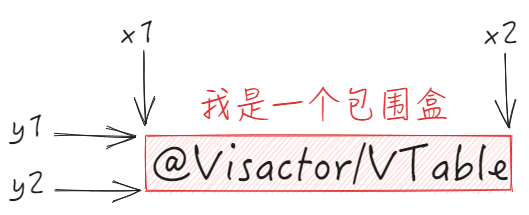
在介绍具体计算逻辑前,有必要先介绍一下包围盒的概念。
在计算机与图形视觉领域,包围盒是一个将物体组合包围起来的一个容器。通过将复杂的物体包装在简单的容器中,实现用简单的包围盒来近似替代复杂几何体的形状,能够提高计算效率,并且通常简单的物体比较容易检查相互之间的重叠。
在 VRender 中实现了 AABBBounds ,AABBBounds 是比较简单的一类包围盒,其紧密性较差。在 VTable 内部,最基本的图元中都会单独维护一份 AABBBounds,通过 AABBBounds 可以完成宽高的计算。
在 AABBBounds 实例中记录当前包围盒的四个顶点的坐标,有了包围盒的概念后,想要实现宽高计算、旋转,裁切的功能就会方便很多了。
比如我们想要得到一段文本的高度,仅需要 this.y2 - this.y1 便可以直接计算得出。
// VisActor/VUtil/blob/main/packages/vutils/src/data-structure/bounds.ts
export class Bounds implements IBounds {
  // 默认初始值是Number.MAX_VALUE
  x1: number;
  y1: number;
  x2: number;
  y2: number;

  constructor(bounds?: Bounds) {
    if (bounds) {
      this.setValue(bounds.x1, bounds.y1, bounds.x2, bounds.y2);
    } else {
      this.clear();
    }
  }
  // ...
  rotate(angle: number = 0, x: number = 0, y: number = 0) {
    const p = this.rotatedPoints(angle, x, y);
    return this.clear().add(p[0], p[1]).add(p[2], p[3]).add(p[4], p[5]).add(p[6], p[7]);
  }
  width(): number {
    if (this.empty()) {
      return 0;
    }
    return this.x2 - this.x1;
  }
  height(): number {
    if (this.empty()) {
      return 0;
    }
    return this.y2 - this.y1;
  }
相关文档
基本宽高计算
VTable 宽高的底层计算都是依赖于 Visactor/Vutils 提供的 AABBBounds 完成计算的。
- 精确计算文本宽高
先通过 getTextBounds 获取文本对应的包围盒,然后再用内部的width和height来获取宽高。
  // VisActor/VUtil/blob/main/packages/vutils/src/graphics/text/measure/textMeasure.ts
  /** 精确计算文本宽高 */
  fullMeasure(text: TextMeasureInput): ITextSize {
    if (isNil(text)) {
      return { width: 0, height: 0 };
    }
    if (isNil(this._option.getTextBounds) || !this._notSupportVRender) {
      return this.measureWithNaiveCanvas(text); // 降级
    }
    const { fontFamily, fontSize, fontWeight, textAlign, textBaseline, ellipsis, limit, lineHeight } = this.textSpec;
    let size: ITextSize;
    //...
     const bounds = this._option.getTextBounds({
        text,
        fontFamily,
        fontSize,
        fontWeight,
        textAlign,
        textBaseline,
        ellipsis: !!ellipsis,
        maxLineWidth: limit || Infinity,
        lineHeight
      });
     size = { width: bounds.width(), height: bounds.height() };
     //...
    return size;
- 使用原生 Canvas 计算宽高
当遇到不支持 VRender 的情况下,会用原生 Canvas 去完成计算。
// VisActor/VUtil/blob/main/packages/vutils/src/graphics/text/measure/textMeasure.ts
  protected _measureWithNaiveCanvas(text: string): ITextSize {
    if (!this.initContext()) {
      return this._quickMeasureWithoutCanvas(text); // 降级
    }
    const metrics = this._context!.measureText(text);
    const { fontSize, lineHeight } = this.textSpec;
    return {
      width: metrics.width,
      height: (lineHeight as number) ?? fontSize,
      fontBoundingBoxAscent: metrics.fontBoundingBoxAscent,
      fontBoundingBoxDescent: metrics.fontBoundingBoxDescent
    };
  }
列宽计算
我们先来看关于列宽的计算
列宽计算模式
表格列宽度的计算模式,有下面三种配置:
-
'standard':使用 width 属性指定的宽度作为列宽度。
-
'adaptive':使用表格容器的宽度分配列宽度。
-
'autoWidth':根据列头和 body 单元格中内容的宽度自动计算列宽度,忽略 width 属性的设置。
计算流程
不同计算模式下的影响
要想计算整列的列宽,不是单独获取某一行的列宽就可以了,而是需要得出一整列中最大的列宽(这点在不同的计算模式下面是不同的效果)才行。
假如有下面三个单元格,三个单元格内容长度都不一样,不能随机获取一个单元格宽度就能做为本列的列宽,必须要有一个确切的宽度。
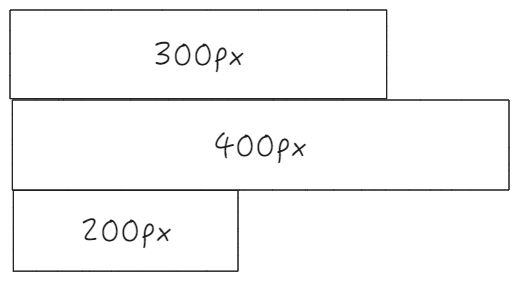
VTable 中针对不同的列宽计算模式,对于列宽的调整有着不同的逻辑:
- standard
标准宽度下,所有的宽度都会根据默认的配置来走;
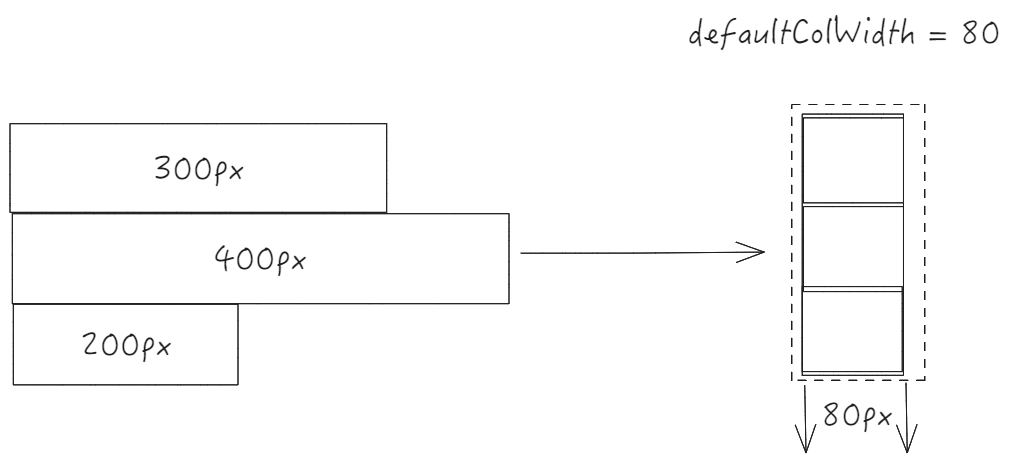
比如上面的三个单元格的列,列宽会被统一调整成 80px;
- autoWidth
autoWidth 模式下,整列的列宽会根据所有列中最长的列进行调整,需要注意的是,最大的列宽不能超过 limitMaxAutoWidth ;
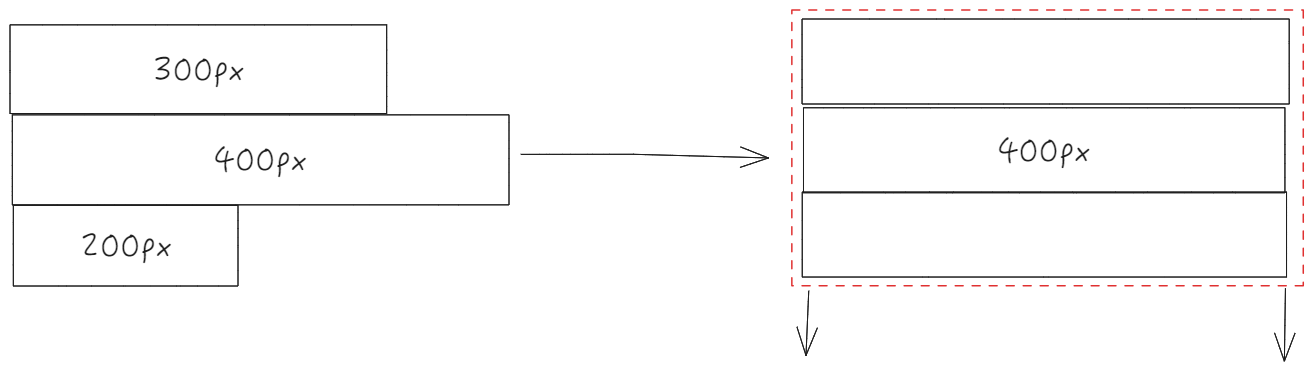
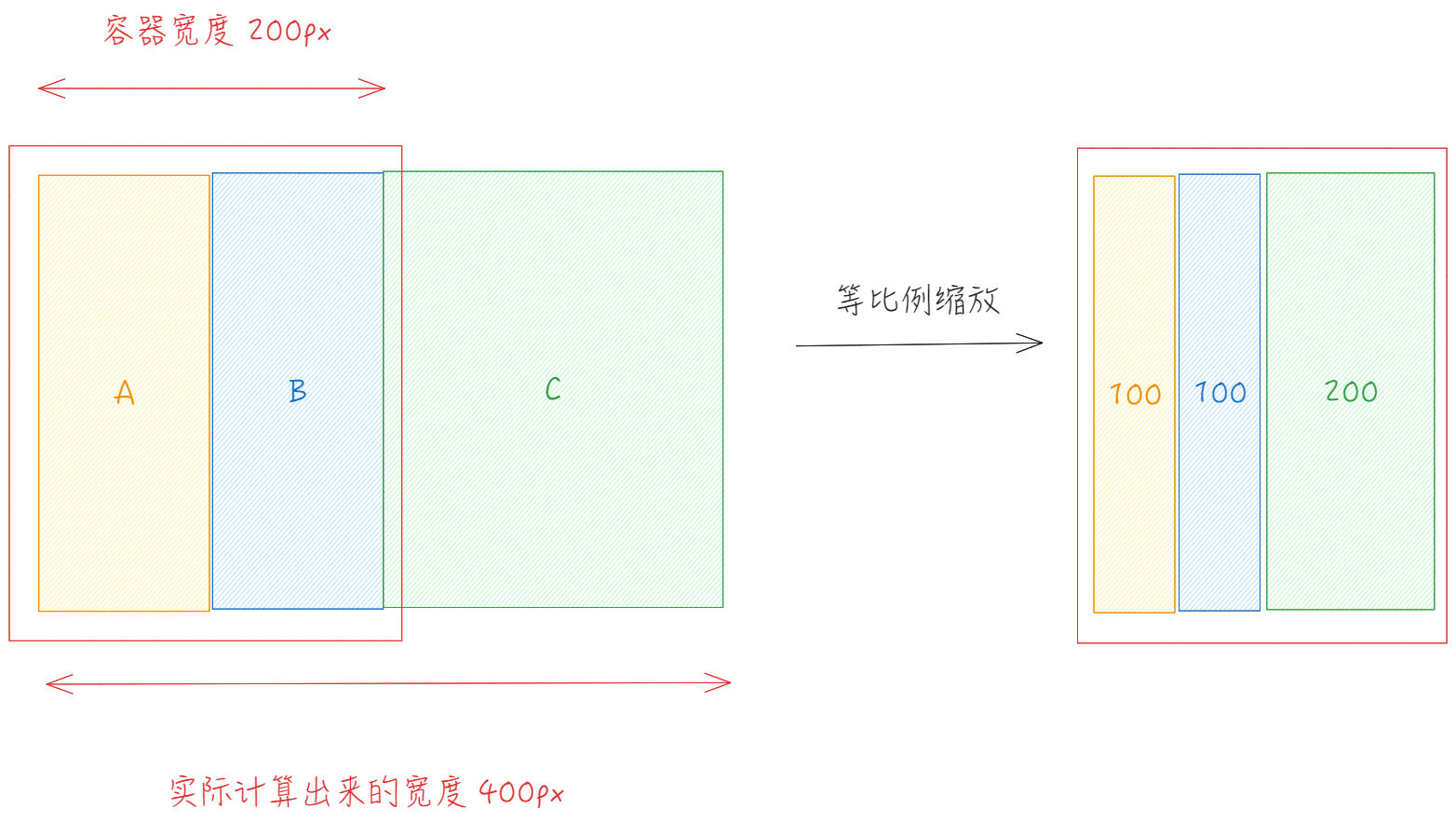
- adaptive
适配容器宽度模式下,会先根据 autoWidth 计算出列宽,然后按照容器列宽和实际列宽的比值来对列宽进行等比例缩放。
多列列宽计算
这里是多列列宽的整体流程图
- computeColsWidth (packages\vtable\src\scenegraph\layout\compute-col-width.ts)
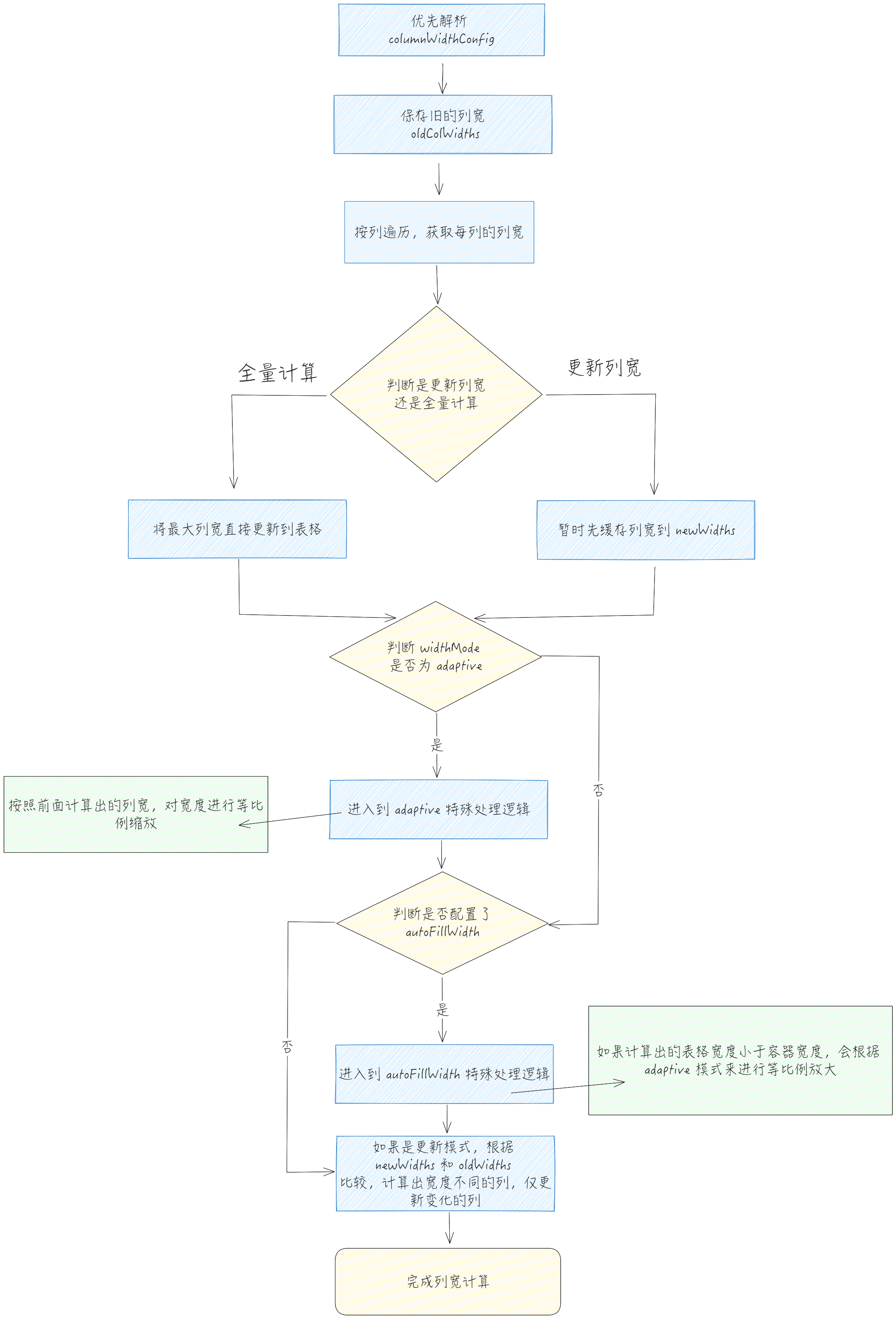
内部会去按列遍历,对每列调用 computeColWidth,单独计算出列的宽度。
单列宽度计算
- computeColWidth
前置流程
在获取整体列宽的过程中,会去对每一列进行遍历,获取这一列的宽度。针对不同的 columnWidthComputeMode,在计算该列时涉及到的行有所不同:
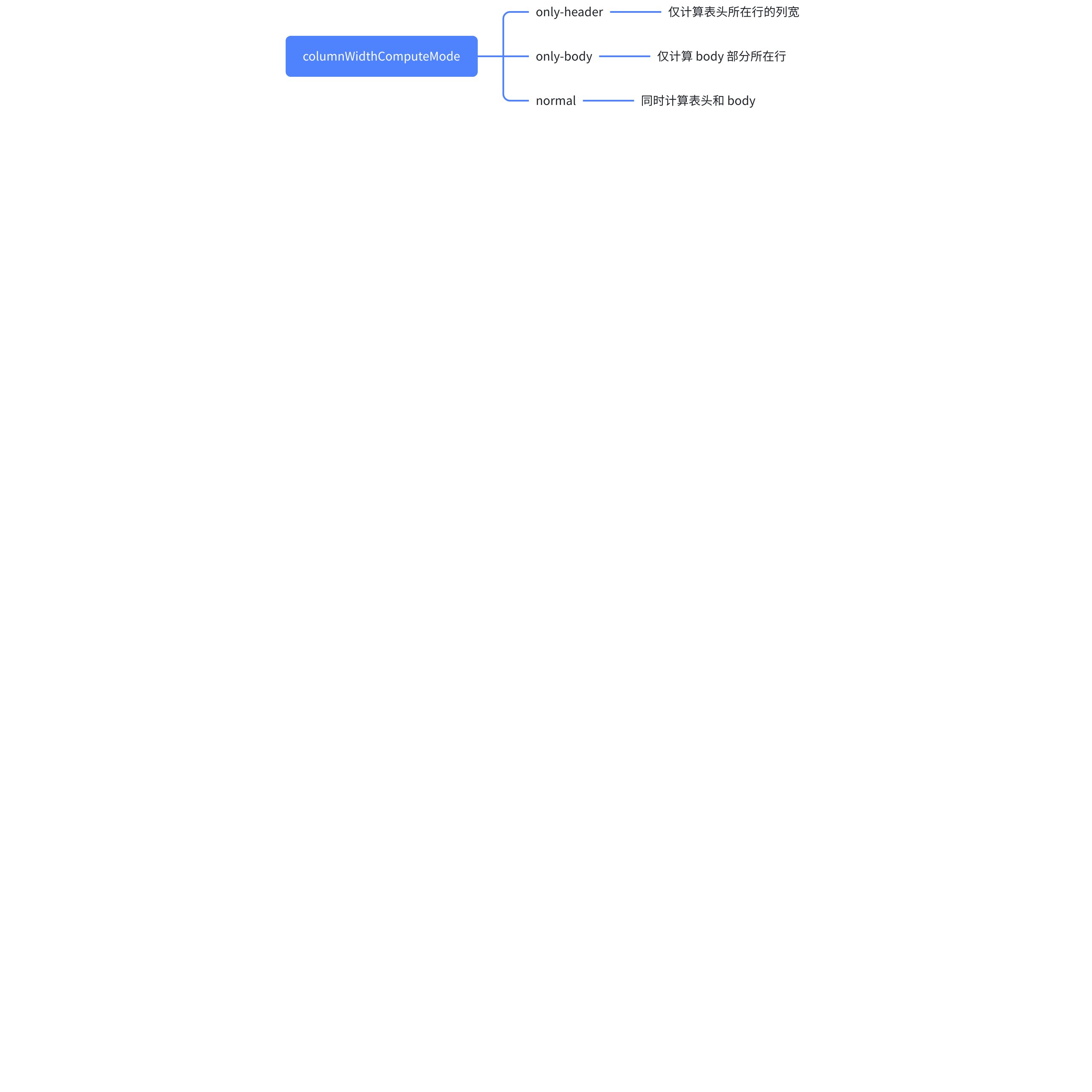
源码
// packages\vtable\src\scenegraph\layout\compute-col-width.ts
export function computeColWidth(
  col: number,
  startRow: number,
  endRow: number,
  table: BaseTableAPI,
  forceCompute: boolean = false *//forceCompute如果设置为true 即便不是自动列宽的列也会按内容计算列宽*
): number {
  // 先判断列宽缓存里的列宽,再判断是否配置中针对该列定义了列宽
  let width = getColWidthDefinedWidthResizedWidth(col, table);

  if (
    table.internalProps.transpose &&
    width === 'auto' &&
    ((table.columnWidthComputeMode === 'only-header' && col >= table.rowHeaderLevelCount) ||
      (table.columnWidthComputeMode === 'only-body' && col < table.rowHeaderLevelCount))
  ) {
    width = table.getDefaultColumnWidth(col);
  }

  if (forceCompute && !table.internalProps.transpose) {
    return computeAutoColWidth(width, col, startRow, endRow, forceCompute, table);
  } else if (typeof width === 'number') {
    return width;
  } else if (width !== 'auto' && typeof width === 'string') {
    *// return calc.toPx(width, table.internalProps.calcWidthContext);*
    return table._adjustColWidth(col, table._colWidthDefineToPxWidth(width));
  }
  return computeAutoColWidth(width, col, startRow, endRow, forceCompute, table);
}
流程图

自动计算列宽
前面的流程中,会有涉及到自动计算列宽的逻辑,计算列宽的核心逻辑位于 computeAutoColWidth 中。
- computeAutoColWidth(packages\vtable\src\scenegraph\layout\compute-col-width.ts)
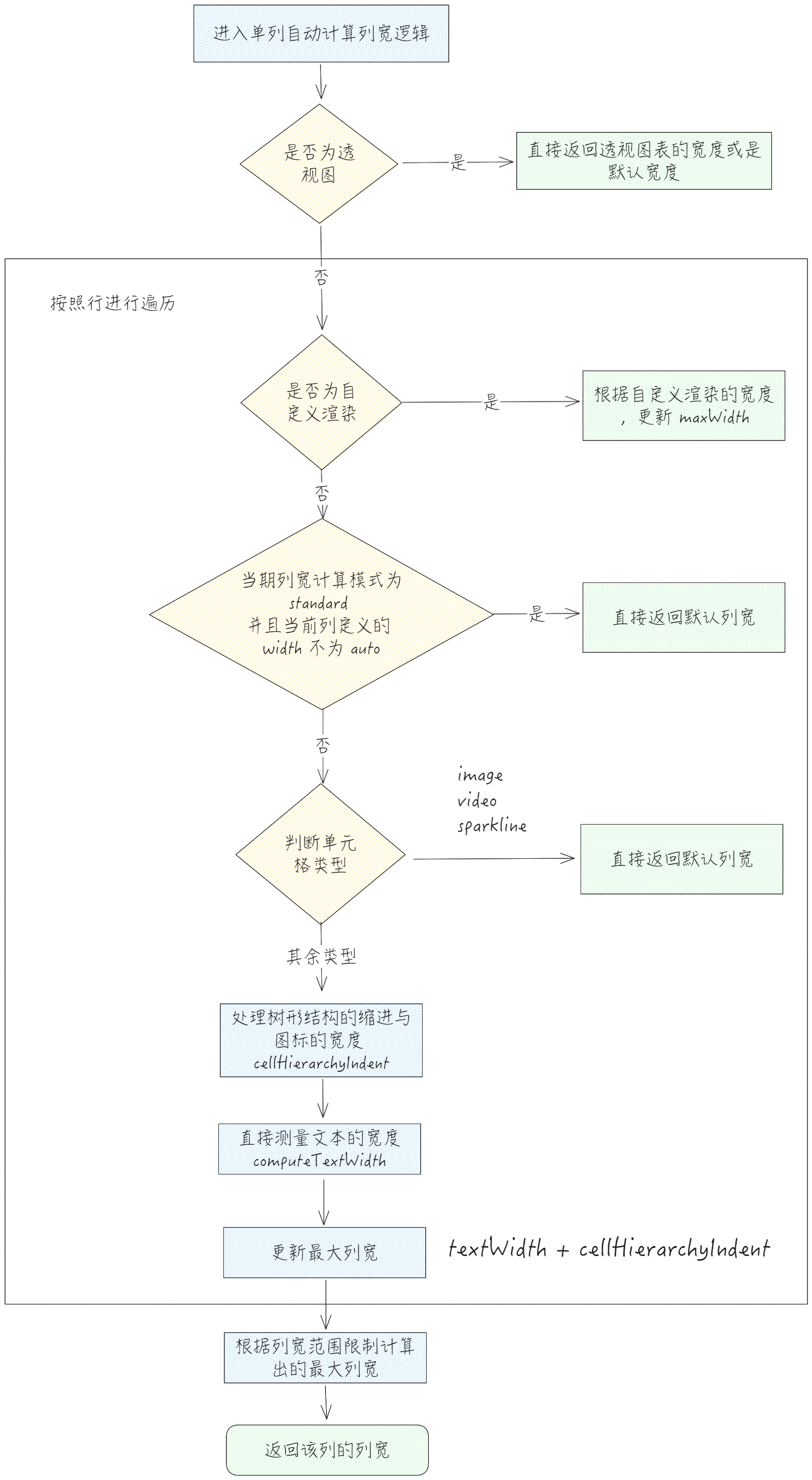
单文本宽度测量
在前面计算宽度的流程中,会涉及到测量文本宽度的情况,下面来分析下单文本宽度测量的流程。
整体流程
- computeTextWidth (packages\vtable\src\scenegraph\layout\compute-col-width.ts)
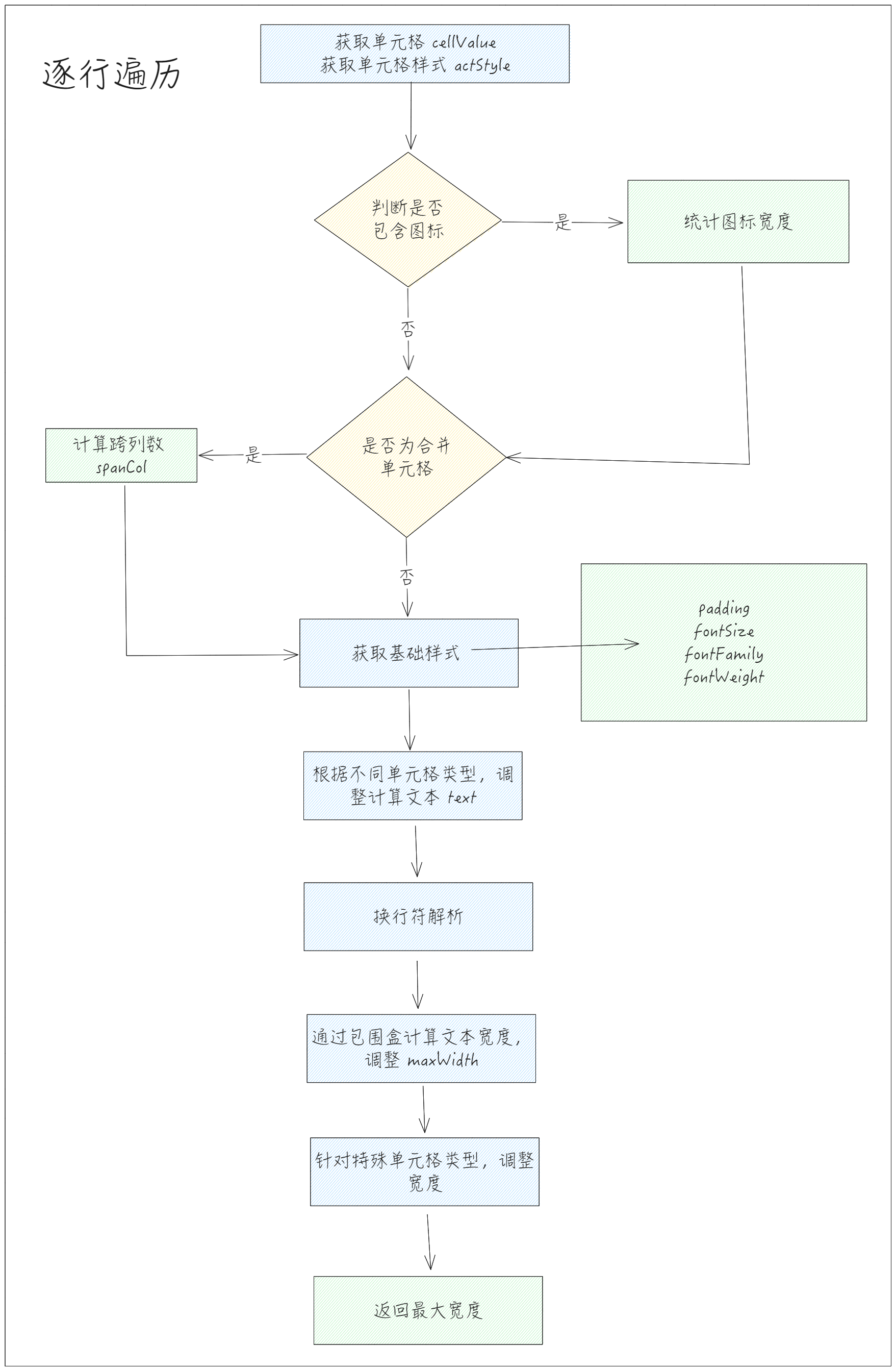
合并单元格处理
对于合并单元格,一个文本会对被多个单元格划分,所以在计算出 width 之后,需要除以合并单元格所跨列数,才能计算出当前单元格实际所占宽度。

不同类型单元格宽度计算公式
在计算完基本的单元格宽度后,需要针对某些特殊单元格重新进行调整,以单选框为例:
- 单选框 radio 计算公式:

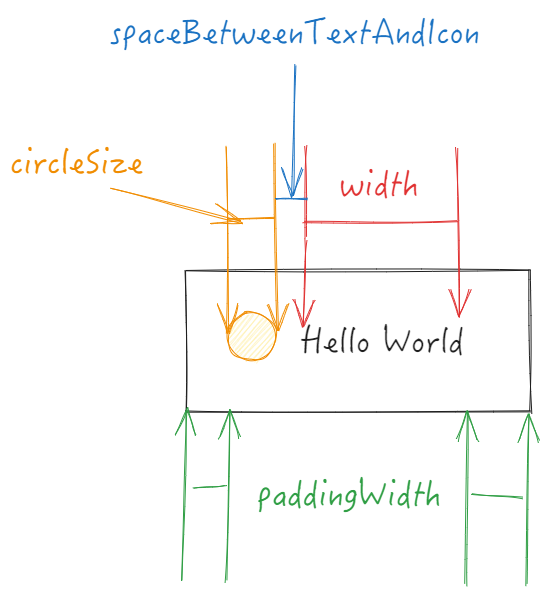
列宽计算整体流程

重新计算
触发时机
触发重新计算有多个触发点,包括:
-
表头展开收起
-
更改单元格值
-
行列新增
-
点击排序
源码 & 实现
我们以新增行时触发的 recalculateColWidths 为例,讲解下重新计算列宽时的流程:
// packages\vtable\src\scenegraph\scenegraph.ts
  */**
*   * recalculates column width in all autowidth columns*
*   */*
  recalculateColWidths() {
    const table = this.table;

    if (table.widthMode === 'adaptive' || table.autoFillWidth || table.internalProps.transpose) {
      computeColsWidth(this.table, 0, this.table.colCount - 1, true);
    } else {
      table._clearColRangeWidthsMap();
      *// left frozen*
      if (table.frozenColCount > 0) {
        computeColsWidth(this.table, 0, table.frozenColCount - 1, true);
      }
      *// right frozen*
      if (table.rightFrozenColCount > 0) {
        computeColsWidth(this.table, table.rightFrozenColCount, table.colCount - 1, true);
      }
      *// body*
      computeColsWidth(table, this.proxy.colStart, this.proxy.colEnd, true);
    }
  }
可以看到, VTable 逐步更新了所有的列,其中所有的 computeColsWidth 的第四个参数都是 true,下面来看下针对 update 为 true 的情况下, VTable 做了什么操作
- 源码
// packages\vtable\src\scenegraph\layout\compute-col-width.ts
function computeColsWidth() {
// ...
  if (update) {
    for (let col = 0; col < table.colCount; col++) {
      const newColWidth = newWidths[col] ?? table.getColWidth(col) ?? table.getColWidth(col);
      if (newColWidth !== oldColWidths[col]) {
        table._setColWidth(col, newColWidth, false, true);
      }
    }
    table.stateManager.checkFrozen();
    for (let col = 0; col < table.colCount; col++) {
      const newColWidth = table.getColWidth(col);
      if (newColWidth !== oldColWidths[col]) {
        table.scenegraph.updateColWidth(col, newColWidth - oldColWidths[col], true, true);
      }
    }
    table.scenegraph.updateContainer(true);
  }
  //...
 }
可以看到,内部会逐列进行判断,将计算出的新宽度与老宽度进行对比,只有在宽度发生变化的时候,才会去重新调整表格宽度,更新场景树图元。随后更新场景树容器。
行高计算
接下来看下关于行高计算的逻辑。
高度计算模式
行高的计算模式有三种, 'standard'(标准模式)、'adaptive'(自适应容器高度模式)或 'autoHeight'(自动行高模式),默认为 'standard'。
-
'standard':采用
defaultRowHeight及defaultHeaderRowHeight作为行高; -
'adaptive':依据计算出来的高度,结合容器高度与计算出来的高度的比值进行等比例缩放;
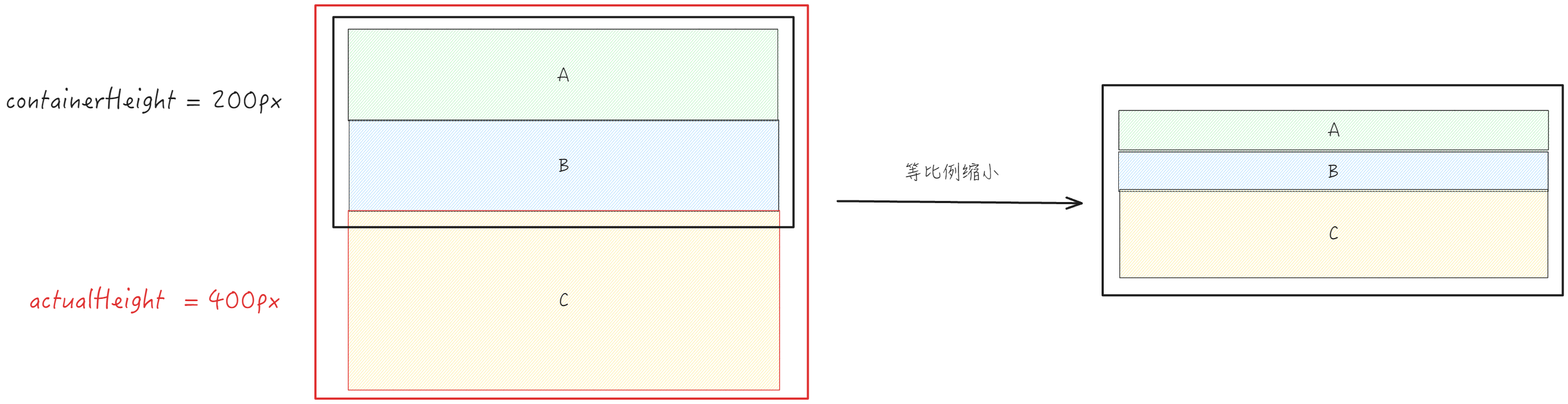
- 'autoHeight':根据内容自动计算行高,计算依据 fontSize 和 lineHeight(文字行高),以及 padding。相关搭配设置项
autoWrapText自动换行,可以根据换行后的多行文本内容来计算行高;
整体流程
- computeRowsHeight
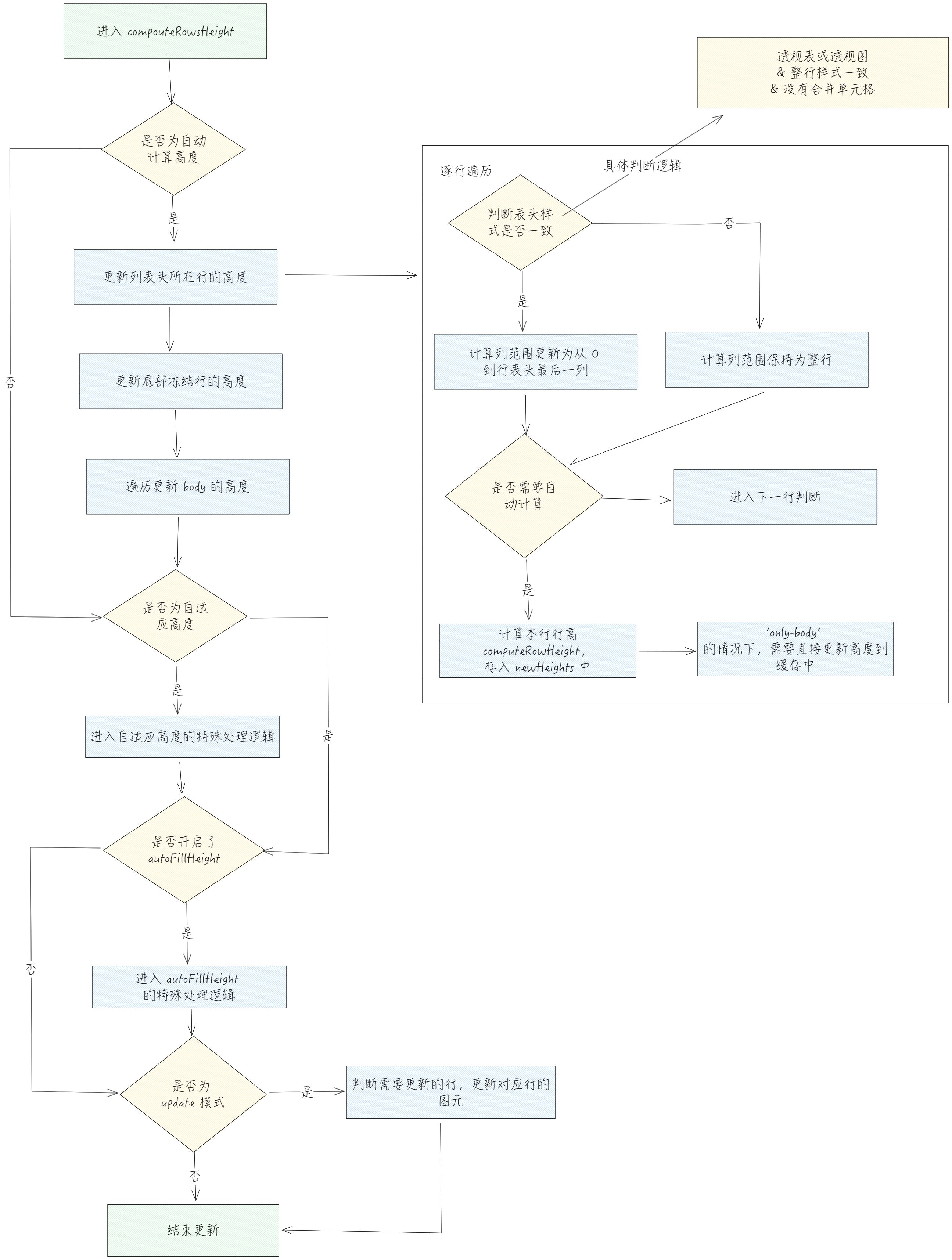
针对每行单独计算的逻辑主要位于 computeRowHeight,该函数会去根据配置信息计算对应行的行高。
自动更新前置判断
进入自动计算行高需要满足以下几个条件之一:

body 部分更新
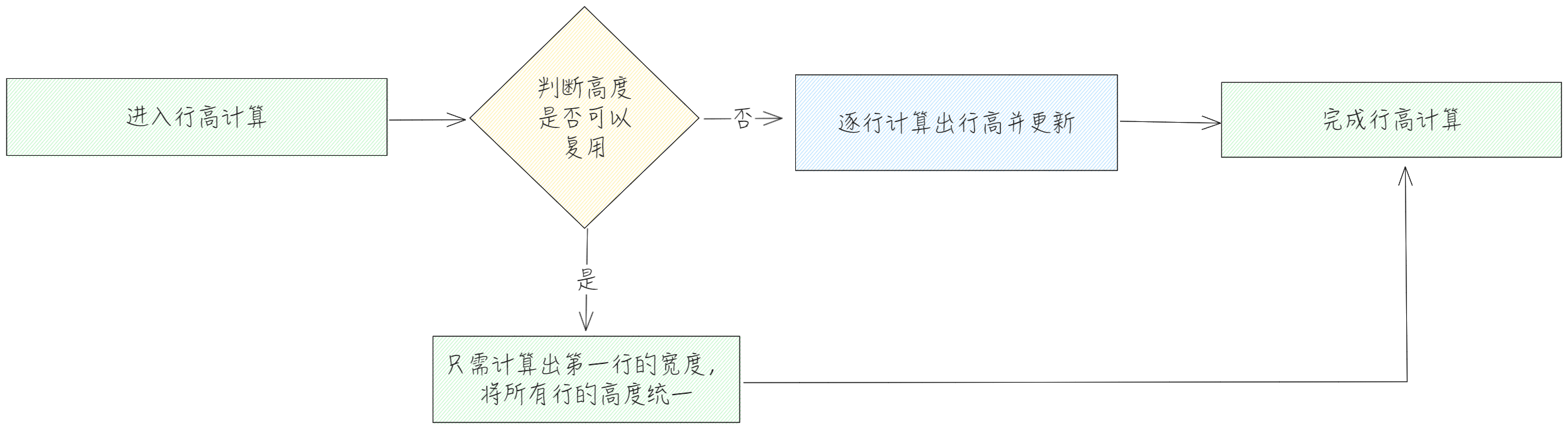
关于 body 部分的更新,针对某些特殊情况,会有一定的性能优化,我们来看下具体是怎么操作的:
- 以列展示
// packages\vtable\src\scenegraph\layout\compute-row-height.ts
if (
  *// 以列展示 且符合只需要计算第一行其他行可复用行高的条条件*
  !(
    table.internalProps.transpose ||
    (table.isPivotTable() && !(table.internalProps.layoutMap as PivotHeaderLayoutMap).indicatorsAsCol)
  ) &&
  !(table.options as ListTableConstructorOptions).customComputeRowHeight &&
  checkFixedStyleAndNoWrap(table)
) {
  *// check fixed style and no wrap situation, fill all row width single compute*
  *// traspose table and row indicator pivot table cannot use single row height*
  const height = computeRowHeight(table.columnHeaderLevelCount, 0, table.colCount - 1, table);
  fillRowsHeight(
    height,
    table.columnHeaderLevelCount,
    table.rowCount - 1 - table.bottomFrozenRowCount,
    table,
    update ? newHeights : undefined
  );
  *//底部冻结的行行高需要单独计算*
  for (let row = table.rowCount - table.bottomFrozenRowCount; row <= rowEnd; row++) {
    const height = computeRowHeight(row, 0, table.colCount - 1, table);
    if (update) {
      newHeights[row] = Math.round(height);
    } else {
      table._setRowHeight(row, height);
    }
  }
}
-
前置判断条件
-
表格没开启行列转置 或者 不是透视表
-
没有配置自定义行高的计算
-
checkFixedStyleAndNoWrap 表格列与单元格样式可以复用
-
具体逻辑
-
仅计算 body 中第一行,其它行复用该高度
-
底部冻结的行行高需要单独计算
-
以行展示
// packages\vtable\src\scenegraph\layout\compute-row-height.ts
if (
  *// 以行展示*
  table.internalProps.transpose ||
  (table.isPivotTable() && !(table.internalProps.layoutMap as PivotHeaderLayoutMap).indicatorsAsCol)
) {
  for (let row = Math.max(rowStart, table.columnHeaderLevelCount); row <= rowEnd; row++) {
    let height;
    if (checkFixedStyleAndNoWrapForTranspose(table, row)) {
      *// 以行展示 只计算到body第一列样式的情况即可*
      height = computeRowHeight(row, 0, table.rowHeaderLevelCount, table);
    } else {
      height = computeRowHeight(row, 0, table.colCount - 1, table);
    }
    if (update) {
      newHeights[row] = Math.round(height);
    } else {
      table._setRowHeight(row, height);
    }
  }
}
-
前置判断条件
-
表格为转置表格 或 透视表 indicatorsAsCol 配置为 false
-
具体逻辑
-
循环遍历 body 行部分
-
样式可复用,行高计算范围仅涉及到行表头
-
不可复用,行高计算范围到列末尾
-
兜底,循环遍历 body 部分 ,逐行调用 computeRowHeight
// packages\vtable\src\scenegraph\layout\compute-row-height.ts
*// 以列展示 需要逐行计算情况*
for (let row = Math.max(rowStart, table.columnHeaderLevelCount); row <= rowEnd; row++) {
  const height = computeRowHeight(row, 0, table.colCount - 1, table);
  if (update) {
    newHeights[row] = Math.round(height);
  } else {
    table._setRowHeight(row, height);
  }
}
高度复用判断
// packages\vtable\src\scenegraph\layout\compute-row-height.ts
function checkFixedStyleAndNoWrap(table: BaseTableAPI): boolean {
  const { layoutMap } = table.internalProps;
  const row = table.columnHeaderLevelCount;
  *//设置了全局自动换行的话 不能复用高度计算*
  if (
    (table.internalProps.autoWrapText || table.internalProps.enableLineBreak || table.isPivotChart()) &&
    (table.isAutoRowHeight() || table.options.heightMode === 'adaptive')
  ) {
    return false;
  }
  // 每列都需要判断
  for (let col = 0; col < table.colCount; col++) {
    const cellDefine = layoutMap.getBody(col, row);
    if (cellDefine.cellType === 'radio') {
      return false;
    }
    // 判断是否配置了自定义函数
    if (
      typeof cellDefine.style === 'function' ||
      typeof (cellDefine as ColumnData).icon === 'function' ||
      (cellDefine.define as ColumnDefine)?.customRender ||
      (cellDefine.define as ColumnDefine)?.customLayout ||
      typeof cellDefine.define?.icon === 'function'
    ) {
      return false;
    }
    const cellStyle = table._getCellStyle(col, row); *//获取的style是结合了theme配置的style*
    if (
      typeof cellStyle.padding === 'function' ||
      typeof cellStyle.fontSize === 'function' ||
      typeof cellStyle.lineHeight === 'function' ||
      cellStyle.autoWrapText === true
    ) {
      return false;
    }
  }
- 转置表格情况下判断
checkFixedStyleAndNoWrapForTranspose
// packages\vtable\src\scenegraph\layout\compute-row-height.ts
function checkFixedStyleAndNoWrapForTranspose(table: BaseTableAPI, row: number): boolean {
  const { layoutMap } = table.internalProps;
  *//设置了全局自动换行的话 不能复用高度计算*
  if (
    (table.internalProps.autoWrapText || table.internalProps.enableLineBreak) &&
    (table.isAutoRowHeight() || table.options.heightMode === 'adaptive')
  ) {
    return false;
  }

  const cellDefine = layoutMap.getBody(table.rowHeaderLevelCount, row);
  // 判断是否配置了自定义函数
  if (
    typeof cellDefine.style === 'function' ||
    typeof (cellDefine as ColumnData).icon === 'function' ||
    (cellDefine.define as ColumnDefine)?.customRender ||
    (cellDefine.define as ColumnDefine)?.customLayout ||
    typeof cellDefine.define?.icon === 'function'
  ) {
    return false;
  }
  const cellStyle = table._getCellStyle(table.rowHeaderLevelCount, row);
  if (
    typeof cellStyle.padding === 'function' ||
    typeof cellStyle.fontSize === 'function' ||
    typeof cellStyle.lineHeight === 'function' ||
    cellStyle.autoWrapText === true
  ) {
    return false;
  }

  return true;
}
单行行高计算
- computeRowHeight
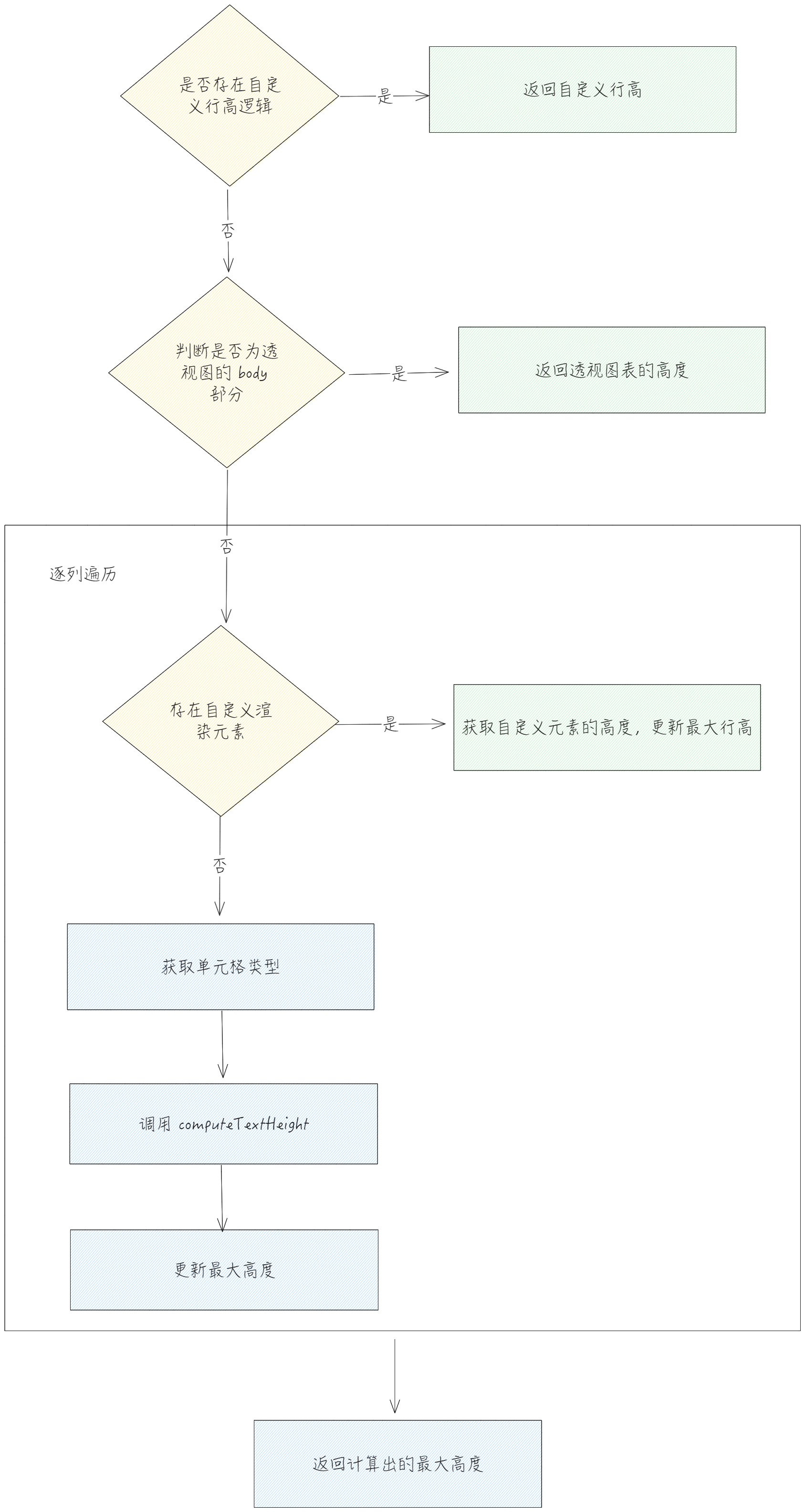
文本高度计算
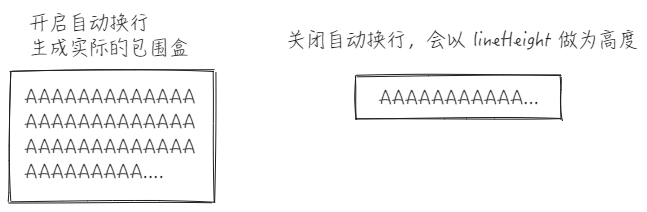
autoWrapText 主要是影响到了文本高度的计算,在自动换行的情况下,会生成 AABBBounds ,生成的时候会去传入文本的宽度,这样就能直接通过 AABBBounds 计算出文本的高度;而在没有开启自动换行时,仅会使用 lineHeight 做为文本高度。
- computeTextHeight 流程
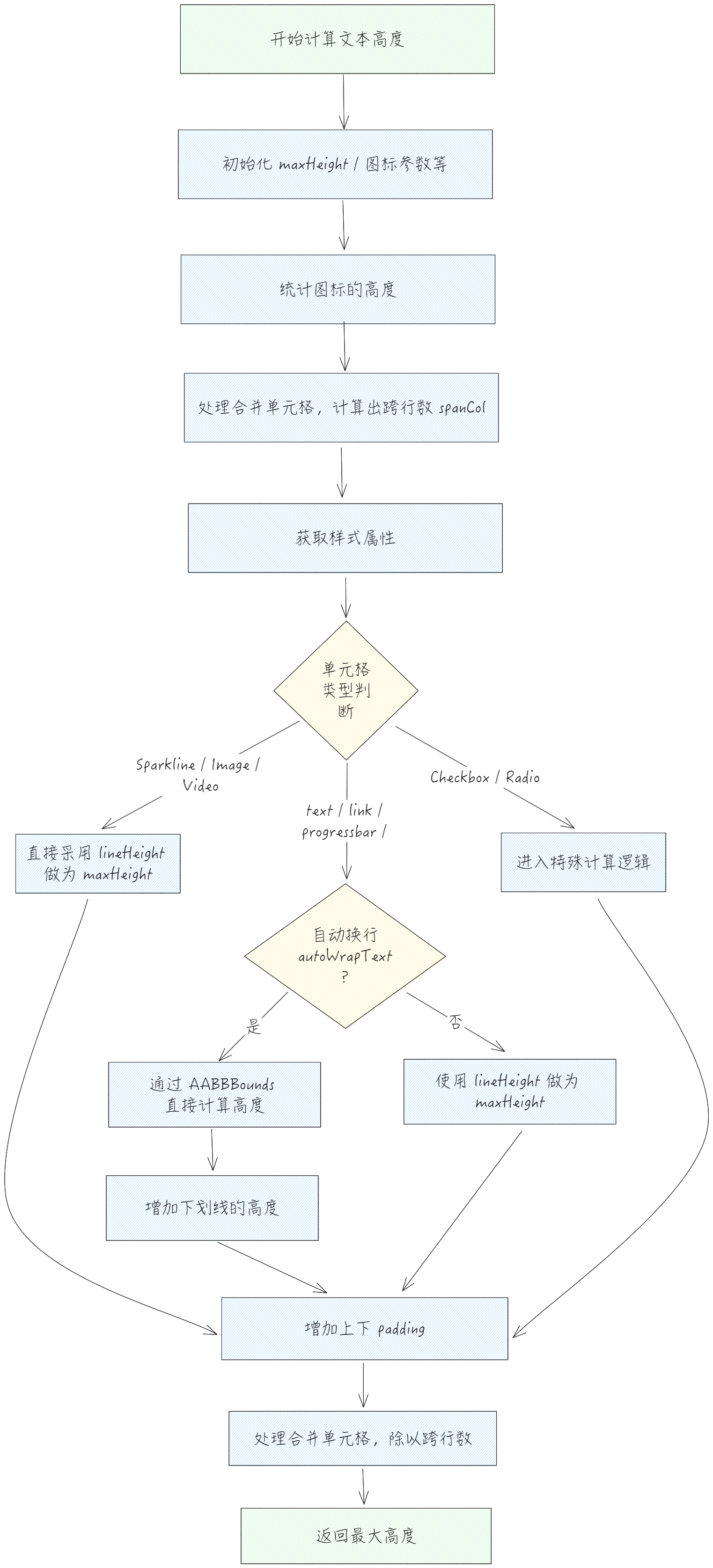
整体的计算公式为 (Math.max(maxHeight, iconHeight) + padding[0] + padding[2]) / spanRow;
大致流程
重新更新
以场景树的 resize 为例,仅当 heightMode 为 adaptive 或 autoFillHeight 为 true 的情况才会去重新计算行高。这里分多种情况:
// packages\vtable\src\scenegraph\scenegraph.ts
resize() {
    // ...
    if (this.table.heightMode === 'adaptive') {
      if (this.table.internalProps._heightResizedRowMap.size === 0) {
        this.recalculateRowHeights();
      } else {
        this.dealHeightMode();
      }
    } else if (this.table.autoFillHeight) {
      this.dealHeightMode();
    }
}
- 未调整过列宽时,需要重新去计算行高,在计算的时候会去根据变化的行去更新场景树的图元。
- recalculateRowHeights ()
// packages\vtable\src\scenegraph\scenegraph.ts
  recalculateRowHeights() {
    const table = this.table;
    table.internalProps.useOneRowHeightFillAll = false;
    if (table.heightMode === 'adaptive' || table.autoFillHeight) {
      computeRowsHeight(this.table, 0, this.table.rowCount - 1, true, true);
    } else {
      *// top frozen*
      if (table.frozenRowCount > 0) {
        computeRowsHeight(this.table, 0, table.frozenRowCount - 1, true, true);
      }
      *// bottom frozen*
      if (table.bottomFrozenRowCount > 0) {
        computeRowsHeight(this.table, table.bottomFrozenRowCount, table.rowCount - 1, true, true);
      }
      computeRowsHeight(table, this.proxy.rowStart, this.proxy.rowEnd, true, true);
    }
  }
- 如果手动调整过列宽或者开启了 autoFillHeight,都会进入到 dealHeightMode。
因为标准模式下不需要去计算行高,在 resize 时直接使用缓存即可,所以只有在 adaptive 或者 autoFillHeight 的时候,才会去根据缓存中的高度,重新调整并分配每一行的高度。
- dealHeightMode
// packages\vtable\src\scenegraph\scenegraph.ts
  dealHeightMode() {
    const table = this.table;
    *// 处理adaptive高度*
    if (table.heightMode === 'adaptive') {
      *// 清空行高缓存*
      table._clearRowRangeHeightsMap();
      *// 计算可分配高度 = 总高度 - 表头高度 - 底部冻结高度*
      const totalDrawHeight = table.tableNoFrameHeight - columnHeaderHeight - bottomHeaderHeight;
      *// 计算实际内容高度*
      for (let row = startRow; row < endRow; row++) {
        actualHeight += table.getRowHeight(row);
      }
      *// 计算缩放比例*
      const factor = totalDrawHeight / actualHeight;
      *// 按比例分配行高(最后一行处理余数)*
      for (let row = startRow; row < endRow; row++) {
        if (row === endRow - 1) {
          rowHeight = totalDrawHeight - 前N-1行总高度;
        } else {
          rowHeight = Math.round(原始行高 * factor);
        }
      }
    } else if (table.autoFillHeight) {
      *// 计算总内容高度*
      for (let row = 0; row < table.rowCount; row++) {
        actualHeight += table.getRowHeight(row);
      }
      *// 当实际高度 < 画布高度时*
      if (实际高度 < 画布高度) {
        *// 计算缩放比例(排除表头)*
        const factor = (canvasHeight - 表头高度) / (实际高度 - 表头高度);
        *// 按比例对行高进行缩放(最后一行处理剩余可分配高度)*
        for (let row = startRow; row < endRow; row++) {
          if (row === endRow - 1) {
            rowHeight = 剩余可分配高度;
          } else {
            rowHeight = Math.round(原始行高 * factor);
          }
        }
      }
    }
  }
本文档由以下人员提供
taiiiyang( https://github.com/taiiiyang)