


开篇
对于所有表格而言,数据源都是必不可少的部分,@Visactor/VTable提供了多种数据源的结构,包括二维数组、对象结构、树形结构、异步懒加载数据源(https://visactor.com/vtable/guide/data/async_data)。如何对这么多种数据结构进行适配,就需要一个合理的数据处理模块,在`@Visactor/VTable`内部就提供了这样的能力,我们来看下基本表格是如何对数据进行解析的。
表格数据处理涉及到的核心类
-
VTable\packages\vtable\src\data\CachedDataSource.ts:
CachedDataSource负责对外部的传入的records进行拦截,同时提供对 records 进行增删改查的api;对DataSource进行了一层包装。 -
VTable\packages\vtable\src\data\DataSource.ts:该类实现了多种数据处理操作,并将原始数据维护在
dataSource.records中以支持表格的动态更新,以及基本表格实例对外提供的增删改查 api 底层实现逻辑。BaseTable会对 DataSource 的实例修改进行劫持,保证 dataSource 修改时会重新渲染基本表格。
ListTable 数据解析原理
前篇文章介绍了 ListTable 的初始化流程 [], 里面简单提了下跟records相关的部分,现在来深入分析下关于 ListTable 数据源的解析过程。
我们以一个简单的案例来进行分析,下面的代码生成了一个基本表格(由于对数据进行解析的过程会涉及到排序,所以在配置中添加了 sortState, 便于去分析 sortState 如何影响数据解析)。
import * as VTable from '../../src';
const CONTAINER_ID = 'vTable';
const generatePersons = count => {
  return Array.from(new Array(count)).map((_, i) => ({
    id: i + 1,
    email1: `${i + 1}@xxx.com`,
  }));
};

export function createTable() {
  const records = generatePersons(2000);
  const columns: VTable.ColumnsDefine = [
    {
      field: 'id',
      title: 'ID',
      sort: true,
    },
    {
      field: 'email1',
      title: 'email',
      sort: true,
    },
  ];
  const option: VTable.ListTableConstructorOptions = {
    container: document.getElementById(CONTAINER_ID),
    records,
    columns,
    widthMode: 'autoWidth',
    sortState: {
      field: 'email1',
      order: 'desc'
    },
  };
  const tableInstance = new VTable.ListTable(document.getElementById(CONTAINER_ID)!, option);
}
在 []中已经介绍了初始化的流程,所有其余流程不进行过多介绍,直接进入到跟 records 相关的部分。
- packages\vtable\src\ListTable.ts

这里做了三个判断,其中两种判断可以归为一种,先来看下面两条分支的判断
传入 records
setRecords
  // packages\vtable\src\ListTable.ts
  */***
*   * 设置表格数据 及排序状态*
*   * @param records*
*   * @param option 附近参数,其中的sortState为排序状态,如果设置null 将清除目前的排序状态*
*   */*
  setRecords(records: Array<any>, option?: { sortState?: SortState | SortState[] | null }): void {
    // 省略
    this.internalProps.dataSource = null;
    // 省略

    *// 清空单元格内容*
    this.scenegraph.clearCells();

    *//重复逻辑抽取updateWidthHeight*
    if (sort !== undefined) {
      if (sort === null || (!Array.isArray(sort) && isValid(sort.field)) || Array.isArray(sort)) {
        this.internalProps.sortState = this.internalProps.multipleSort ? (Array.isArray(sort) ? sort : [sort]) : sort;
        this.stateManager.setSortState((this as any).sortState as SortState);
      }
    }

    if (records) {
      _setRecords(this, records);
      if ((this as any).sortState) {
        const sortState = Array.isArray((this as any).sortState) ? (this as any).sortState : [(this as any).sortState];

        *// 根据sort规则进行排序*
        if (sortState.some((item: any) => item.order && item.field && item.order !== 'normal')) {
          if (this.internalProps.layoutMap.headerObjectsIncludeHided.some(item => item.define.sort !== false)) {
            this.dataSource.sort(
              sortState.map((item: any) => {
                const sortFunc = this._getSortFuncFromHeaderOption(undefined, item.field);
                *// 如果sort传入的信息不能生成正确的sortFunc,直接更新表格,避免首次加载无法正常显示内容*
                const hd = this.internalProps.layoutMap.headerObjectsIncludeHided.find(
                  (col: any) => col && col.field === item.field
                );
                return {
                  field: item.field,
                  order: item.order || 'asc',
                  orderFn: sortFunc ?? defaultOrderFn
                };
              })
            );
          }
        }
      }
      this.refreshRowColCount();
    } else {
      _setRecords(this, records);
    }

    *// 生成单元格场景树*
    this.scenegraph.createSceneGraph();
    //... 省略
    this.render();

  }
-
首先清空原先的 dataSource,兼容以前的 sort 配置,然后清空所有单元格内容;
-
接下来通过 stateManager.setSortState 方法更新内部的 this.sort ,获得 sort 对应单元格的基本信息。setSortState 中会根据传入的 sortState 配置和 column 信息去生成 sort 配置。
-
进入下一个分支,判断是否存在 records,两种判断都会进入到 _setRecords 中,两种判断的区别仅在于,如果传入 records 的话,则会根据 sortState 和 column 上的 sort 配置进行初始排序。
_setRecords
// packages\vtable\src\core\tableHelper.ts
*// 先卸载 dataSource 上监听的所有事件,然后执行 fn,最后重新监听 dataSource 上的事件*
export function _dealWithUpdateDataSource(table: BaseTableAPI, fn: (table: BaseTableAPI) => void): void {
  const { dataSourceEventIds } = table.internalProps;

  if (dataSourceEventIds) {
    dataSourceEventIds.forEach((id: any) => table.internalProps.handler.off(id));
  }

  fn(table);

  table.internalProps.dataSourceEventIds = [
    table.internalProps.handler.on(table.internalProps.dataSource, DataSource.EVENT_TYPE.CHANGE_ORDER, () => {
      if (table.dataSource.hierarchyExpandLevel) {
        table.refreshRowColCount();
      }
      table.render();
    })
  ];
}

*/** @private */*
export function _setRecords(table: ListTableAPI, records: any[] = []): void {
  _dealWithUpdateDataSource(table, () => {
    table.internalProps.records = records;
    const newDataSource = (table.internalProps.dataSource = CachedDataSource.ofArray(
      records,
      table.internalProps.dataConfig,
      table.pagination,
      table.internalProps.columns,
      table.internalProps.layoutMap.rowHierarchyType,
      getHierarchyExpandLevel(table)
    ));
    // 添加到 releaseList 中
    table.addReleaseObj(newDataSource);
  });
}
_setRecords 中调用了 _dealWithUpdateDataSource ,传入了一个回调函数;
在 _dealWithUpdateDataSource 中,第一步先是卸载掉所有跟 dataSource 有关的监听事件,第二步执行传入的回调函数,第三步再去绑定 CHANGE_ORDER 事件到 dataSource 上,当触发 CHANGE_ORDER 事件时,就会去重新渲染表格。
再回到传入的回调函数中,首先是更新了 internalProps 中的 records ,保存下外部传入的原始 records,随后调用了 CachedDataSource.ofArray 方法获得 CachedDataSource 的实例,赋值给 table.internalProps.dataSource;
在 ofArray 解析数据前,会调用 getHierarchyExpandLevel 获取当前树形结构展开的层级,并将其做为最后一个参数传递到 ofArray 当中。
在 _setRecords 完成后 便是调用 this.scenegraph.createSceneGraph() 和 this.render() 触发表格渲染。
传入 dataSource
由于 BaseTable 中实现了对 dataSource 的代理,当传入 dataSource 时,会直接走 set dataSource 的流程
// packages\vtable\src\ListTable.ts
  set dataSource(dataSource: CachedDataSource | DataSource) {
    *// 清空单元格内容*
    this.scenegraph.clearCells();
    _setDataSource(this, dataSource);
    this.refreshRowColCount();
    *// 生成单元格场景树*
    this.scenegraph.createSceneGraph();
    this.render();
  }
_setDataSource
相对于只传入 records 的 _setRecords 方法,在传入 dataSource 时,VTable 内部调用了 _setDataSource ,下图是 _setDataSource 的过程。
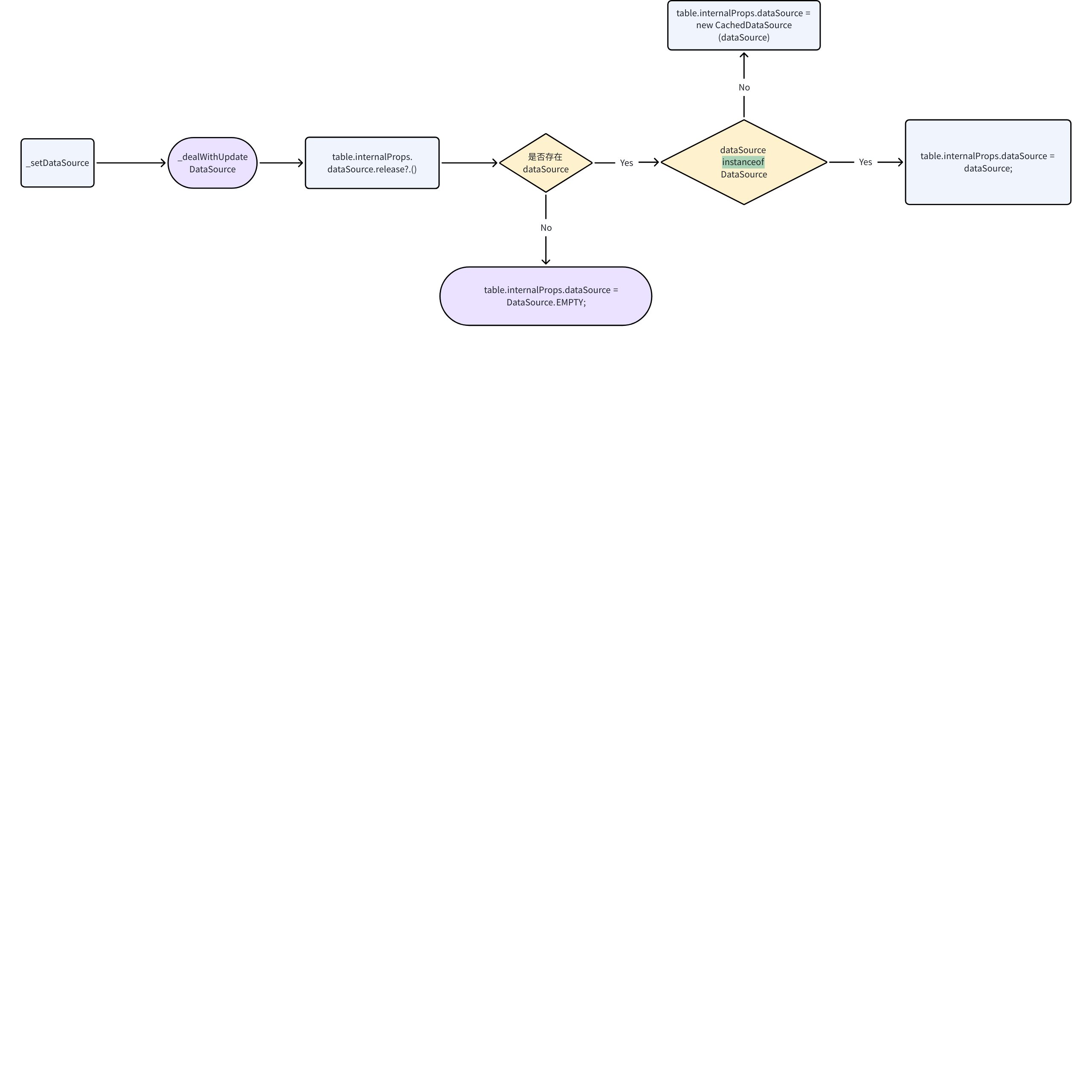
在完成对 dataSource 的初始化后,就跟传入 records 的后半段过程一样,set dataSource 中调用了 this.render() 触发表格渲染。到此就完成了 ListTable 的数据解析, dataSource 在基本表格中主要是用于 body 的解析。
CachedDataSource 前置处理
总结下大致的数据处理流程,可以得到下面这张流程图:

总结下来,无论是传入 dataSource 还是 records ,都免不了涉及到 CachedDataSource,下面针对 CachedDataSource 进行详解。
CachedDataSource 核心处理
前面传入 records 的情况提到了 CachedDataSource.ofArray 方法,通过观察 ofArray 方法,发现其本质上还是 new CachedDataSource,只不过对 records 进行了适配,而 ofArray 方法 的第一个参数就是 options.records。
注意看到 CachedDataSource 的一个参数里面传入了 records,这里为什么要传入 records ,后续会进行讲解。
// packages\vtable\src\data\CachedDataSource.ts
  static ofArray(
    array: any[],
    dataConfig?: IListTableDataConfig,
    pagination?: IPagination,
    columns?: ColumnsDefine,
    rowHierarchyType?: 'grid' | 'tree',
    hierarchyExpandLevel?: number
  ): CachedDataSource {
    return new CachedDataSource(
      {
        get: (index: number): any => {
          *// if (Array.isArray(index)) {*
          *//   return getValueFromDeepArray(array, index);*
          *// }*
          return array[index];
        },
        length: array.length,
        records: array
      },
      dataConfig,
      pagination,
      columns,
      rowHierarchyType,
      hierarchyExpandLevel
    );
  }
观察 CacheDataSource 的 constructor,能够发现 CachedDataSource 继承了 DataSource ,在初始化 CachedDataSource 的时候,根据 groupByRules 去更新了 _isGrouped 字段,这个字段会在影响到 getCellValue 的调用。在完成一些基本操作后,直接初始化了 DataSouce。
// packages\vtable\src\data\CachedDataSource.ts
export class CachedDataSource extends DataSource {
 /// ....
  constructor(
    opt?: DataSourceParam,
    dataConfig?: IListTableDataConfig,
    pagination?: IPagination,
    columns?: ColumnsDefine,
    rowHierarchyType?: 'grid' | 'tree',
    hierarchyExpandLevel?: number
  ) {
    let _isGrouped;
    if (isArray(dataConfig?.groupByRules)) {
      rowHierarchyType = 'tree';
      _isGrouped = true;
    }
    super(opt, dataConfig, pagination, columns, rowHierarchyType, hierarchyExpandLevel);
    this._isGrouped = _isGrouped;
    this._recordCache = [];
    this._fieldCache = {};
  }
  // ...
}
DataSource 初始化
对于基本表格的数据处理, DataSource 是最重要的部分,包括 records 的增删改查,表格 body 部分的取值,都是依赖于该模块。
DataSource 初始化时支持六个参数
-
dataSourceObj: 数据源对象,内部可以传入 records,前面在提到 ofArray 方法时,会在该参数内部携带 records
-
dataConfig: 数据解析配置
-
pagination:当前分页配置
-
columns:当前列配置
-
rowHierachyType:层级维度结构显示形式,平铺还是树形结构。该配置仅在透视表使用
-
hierarchyExpandLevel:树形结构展开的层级,会在 initTreeHierarchyState 中影响到树形结构的初始化
// packages\vtable\src\data\DataSource.ts
export class DataSource extends EventTarget implements DataSourceAPI {
// ...
 constructor(
    dataSourceObj?: DataSourceParam,
    dataConfig?: IListTableDataConfig,
    pagination?: IPagination,
    columns?: ColumnsDefine,
    rowHierarchyType?: 'grid' | 'tree',
    hierarchyExpandLevel?: number
  )
 //...
 }
下面是 DataSource 的解析流程
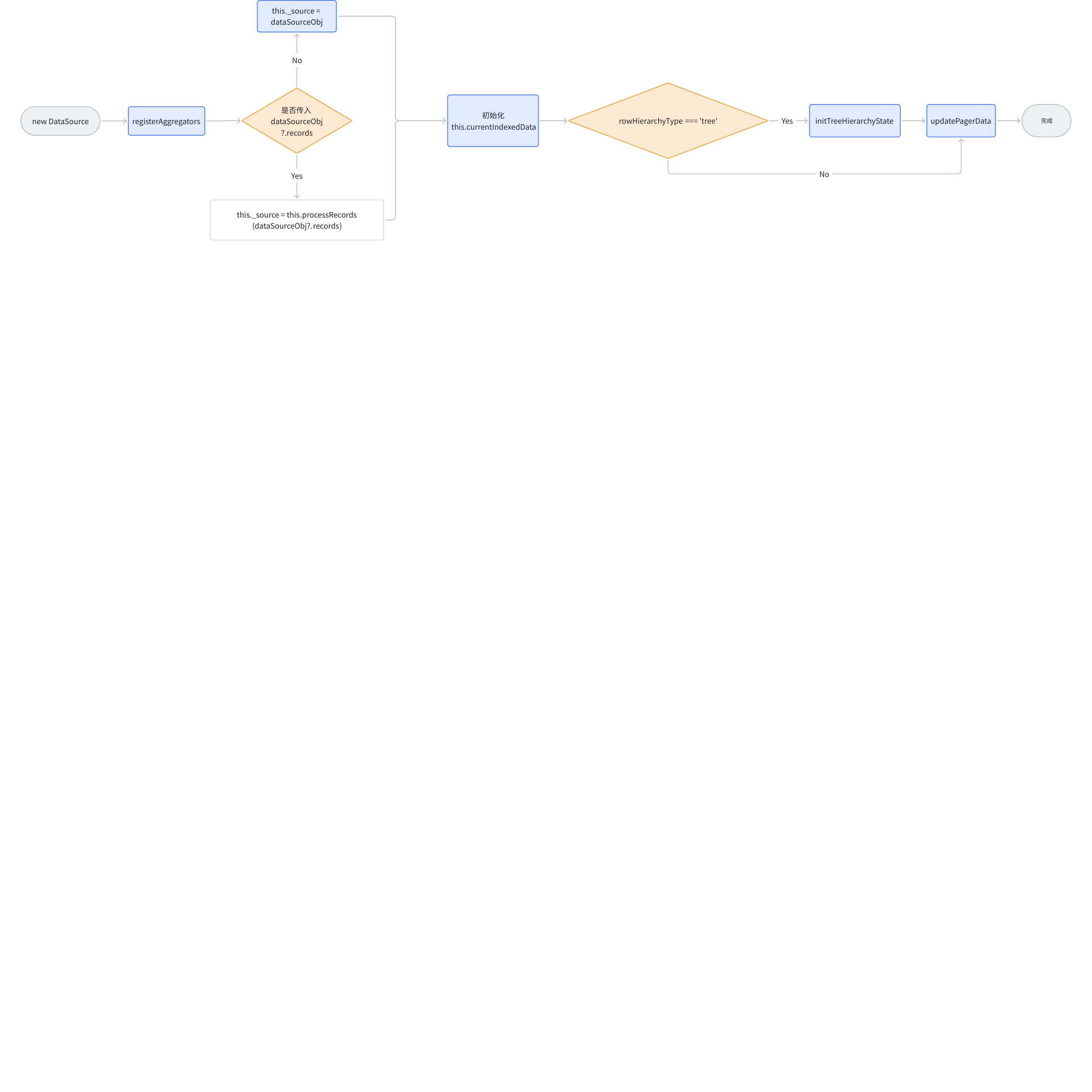
DataSource 核心功能点
-
_source:ListTable 将原始的 records 存入到 DataSource._source 中,并且对 DataSource.records 实现了代理,访问 dataSource.records 实际上就是访问 dataSource._source。
-
currentIndexedData:每一行对应源数据的索引*,是一个二维数组的结构,用来存储展示数据的下标,涉及到基本表格的布局和数据展示。*下面的一个例子展示了树形结构下的 currentIndexedData 。ListTable 主要的数据处理,包括树形结构的生成、单元格内容的获取、排序、_currentPagerIndexedData 的生成都依赖于该字段。
[
  0, // 数据源对应第1条数据 紧邻其下的是第1条数据的子节点 说明第1条数据被展开了
  [0, 0], // 数据源对应第1条下的 第1个子节点
  [0, 1], // 数据源对应第1条下的 第2个子节点
  1, // 数据源对应第2条数据
  [1, 0], // 以此类推 。。。
  [1, 1],
  [1, 2],
  [1, 3],
  2,
  [2, 0],
  [2, 1],
  3
];
例如 DataSource.sort 方法实际上就是对其进行排序,不会去更新传入的 records,只会更新 currentIndexedData;
涉及到的核心功能函数解析
下图展示了前面提到了关于数据解析过程所有的关键函数及其作用。
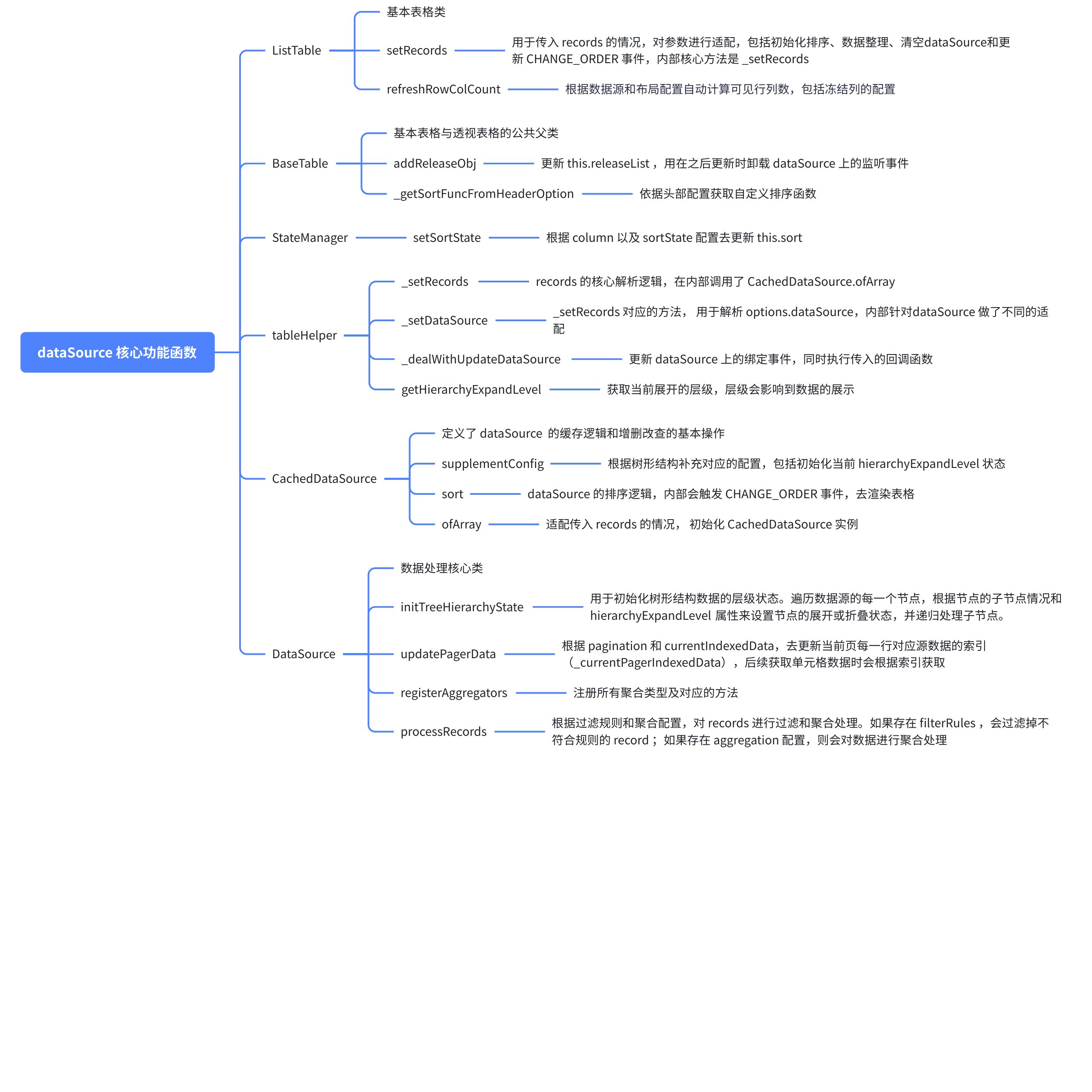
高效的数据增删改查
整体更新与局部更新
试想一下,在大量表格列的场景,如何去高效的更新表格同时不卡顿。常用的基于 Vue 或是 React 的表格组件库,大多都是原生 DOM ,可以去依赖 VDom 自带的 diff 与更新算法去完成 DOM 复用,实现高性能的全量更新数据源操作。但 @Visactor/VTable 是基于 canvas 来完成绘制的,并没有虚拟DOM的概念,那么如何实现类似的操作、并且不影响性能就成了一个难题。ListTable 向外暴露了很多更新数据源的API,包括了全量更新和局部更新,我们从几个常用的 API 来看下在 ListTable 内部是如何进行优化的。
addRecords
翻阅 ListTable 源码,我们能够很轻易的看到 addRecords 的定义:
// packages\vtable\src\ListTable.ts
  */***
*   * 添加数据 支持多条数据*
*   * @param records 多条数据*
*   * @param recordIndex 向数据源中要插入的位置,从0开始。不设置recordIndex的话 默认追加到最后。*
*   * 如果设置了排序规则recordIndex无效,会自动适应排序逻辑确定插入顺序。*
*   * recordIndex 可以通过接口getRecordShowIndexByCell获取*
*   */*
  addRecords(records: any[], recordIndex?: number | number[]) {
    listTableAddRecords(records, recordIndex, this);
    this.internalProps.emptyTip?.resetVisible();
  }
listTableAddRecords
addRecords 中直接调用了 listTableAddRecords 方法,ListTable 就是在这个函数中进行更新数据的优化。
// packages\vtable\src\core\record-helper.ts
*/***
* * 添加数据 支持多条数据*
* * @param records 多条数据*
* * @param recordIndex 向数据源中要插入的位置,从0开始。不设置recordIndex的话 默认追加到最后。*
* * 如果设置了排序规则recordIndex无效,会自动适应排序逻辑确定插入顺序。*
* * recordIndex 可以通过接口getRecordShowIndexByCell获取*
* */*
export function listTableAddRecords(records: any[], recordIndex: number | number[], table: ListTable) {
  if (table.options.groupBy) {
    (table.dataSource as CachedDataSource).addRecordsForGroup?.(records, recordIndex);
    // 刷新行列数
    table.refreshRowColCount();
    // 如果有排序直接触发排序数据
    table.sortState && sortRecords(table);

    *// 更新整个场景树*
    table.scenegraph.clearCells();
    table.scenegraph.createSceneGraph();
  } else if ((table.dataSource as CachedDataSource).rowHierarchyType === 'tree') {
    (table.dataSource as CachedDataSource).addRecordsForTree?.(records, recordIndex);
    // 省略,与上一个分支相同
  } else if (table.sortState) {
    table.dataSource.addRecordsForSorted(records);
    // 由于排序必定会打乱顺序,所有必须得重新更新场景树
    sortRecords(table);
    *// 更新整个场景树 省略*
  } else {
    // 省略
    table.dataSource.addRecords(records, recordIndex);
    const oldRowCount = table.transpose ? table.colCount : table.rowCount;
     // 省略
    if (table.scenegraph.proxy.totalActualBodyRowCount === 0) {
    *// body 单元格为 0 的情况,直接更新整个场景树*
    // 省略
      return;
    }
    const newRowCount = table.transpose ? table.colCount : table.rowCount;
    if (table.pagination) {
      // 省略
      if (recordIndex < endIndex) {
        *// 插入当前页或者前面的数据才需要更新 如果是插入的是当前页后面的数据不需要更新场景树*
        if (recordIndex < endIndex - perPageCount) {
          *// 如果是当页之前的数据 则整个场景树都更新*
        } else {
          *// 如果是插入当前页数据*
          const rowNum = recordIndex - (endIndex - perPageCount) + headerCount;
          if (oldRowCount - headerCount === table.pagination.perPageCount) {
            *// 如果当页数据是满的 则更新插入的部分行,只计算当前页的数据*
            // updateRows 是 [{ row: xxx, col: xxx}] 的格式
            // 省略
            table.transpose ? table.scenegraph.updateCol([], [], updateRows) : table.scenegraph.updateRow([], [], updateRows);
          } else {
            *// 如果当页数据不是满的 则插入新数据*
            // 省略
            table.transpose ? table.scenegraph.updateCol([], addRows, []) : table.scenegraph.updateRow([], addRows, []);
          }
        }
      }
    } else {
      // 省略,如果没有分页的话,则需要计算出哪些需要添加,哪些需要更新,只有聚合的情况会有 updateRows
      table.transpose ? table.scenegraph.updateCol([], addRows, updateRows) : table.scenegraph.updateRow([], addRows, updateRows);
    }
  }
}
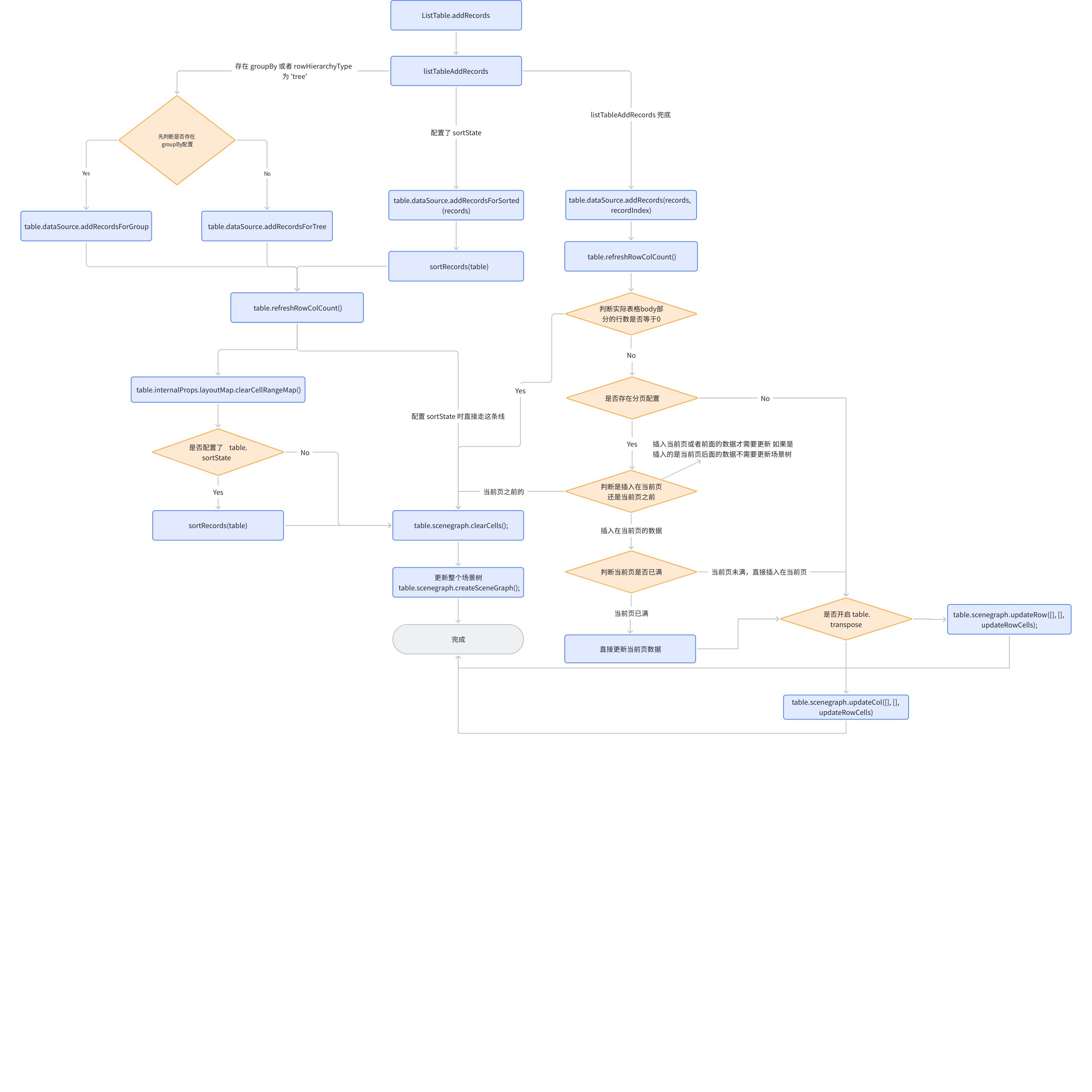
内部包含了四条分支,前两条分支都是相同的逻辑,区别仅在于调用 dataSource.addRecordsForGroup 还是 dataSource.addRecordsForTree,调用完成后,直接更新整个场景树;
第三条分支判断了 sortState,通过 dataSource.addRecordsForSorted 添加数据并排序,直接更新整个场景树;
最重要的是最后一条分支,先是调用了 dataSource.addRecords 添加数据,随后通过计算判断出哪些行列实际需要更新,,通过 updateCol 或 updateRow 去进行局部更新,减少性能浪费。
涉及到 DataSource 中的功能
-
DataSource.addRecords:将多条数据recordArr 依次添加到index位置处,同时更新 currentIndexedData和分页数据;
-
CachedDataSource.addRecordsForGroup:在分组中进行表格数据追加;
-
DataSource.addRecordsForSorted:更新 records 的同时清空 sortedIndexMap;
-
DataSource.addRecordsForTree:更新 records 的同时调整树形结构展开状态;
addRecords 全流程
updateRecords
仔细思考一下,对于数据更新,是否跟添加数据差不多,在某些情况下不需要去更新场景树,只需要跟 addRecords 一样,对特定行进行更新即可。
跟 addRecords 相同,updateRecords 也定义在 ListTable 类中,可以看到在 updateRecords 内部只调用了 listTableUpdateRecords。
// packages\vtable\src\ListTable.ts
  */***
*   * 修改数据 支持多条数据*
*   * @param records 修改数据条目*
*   * @param recordIndexs 对应修改数据的索引(显示在body中的索引,即要修改的是body部分的第几行数据)*
*   */*
  updateRecords(records: any[], recordIndexs: (number | number[])[]) {
    listTableUpdateRecords(records, recordIndexs, this);
  }
listTableUpdateRecords
// packages\vtable\src\core\record-helper.ts
/**
 * 修改数据 支持多条数据
 * @param records 修改数据条目
 * @param recordIndexs 对应修改数据的索引(显示在body中的索引,即要修改的是body部分的第几行数据)
 */
export function listTableUpdateRecords(records: any[], recordIndexs: (number | number[])[], table: ListTable) {
  if (!recordIndexs?.length) return;

  if (table.options.groupBy) {
    // 优先判断是否配置分组
    (table.dataSource as CachedDataSource).updateRecordsForGroup?.(records, recordIndexs as number[]);
      // 通用更新流程,更新场景树
      table.scenegraph.clearCells();
      table.scenegraph.createSceneGraph();
  } else if ((table.dataSource as CachedDataSource).rowHierarchyType === 'tree') {
    // 树形结构
    (table.dataSource as CachedDataSource).updateRecordsForTree?.(records, recordIndexs as number[]);
    // 省略:通用更新流程,更新场景树
  } else if (table.sortState) {
    // 配置了排序
    table.dataSource.updateRecordsForSorted(records, recordIndexs as number[]);
    sortRecords(table);
    // 省略:通用更新流程,更新场景树
  } else {
    // 默认分支
    const updateRecordIndexs = table.dataSource.updateRecords(records, recordIndexs);
    if (!updateRecordIndexs.length) return;
    if (table.pagination) {
        // 省略
        // recordIndexsMinToMax 为需要更新的行号
        const updateRows = [];
        for (let index = 0; index < recordIndexsMinToMax.length; index++) {
          const recordIndex = recordIndexsMinToMax[index];
          // 这里只会去计算在当前页的需要更新的行
          if (recordIndex < endIndex && recordIndex >= endIndex - perPageCount) {
           // 计算实际渲染行号(考虑表头、聚合行等因素),只计算在当前页的数据
            const rowNum =
              recordIndex -
              (endIndex - perPageCount) +
              (table.transpose ? table.rowHeaderLevelCount : table.columnHeaderLevelCount) +
              topAggregationCount;
            updateRows.push(rowNum);
          }
        }
        if (updateRows.length >= 1) {
          // updateRowCells 为 上面计算出的 updateRows 跟聚合行的和
          table.transpose
            ? table.scenegraph.updateCol([], [], updateRowCells)
            : table.scenegraph.updateRow([], [], updateRowCells);
        }
      } else {
        const updateRows = [];
        // 省略:获取 updateRowCells
        // 计算方式为 需要更新的行加顶部和底部的聚合行
        table.transpose
            ? table.scenegraph.updateCol([], [], updateRowCells)
            : table.scenegraph.updateRow([], [], updateRowCells);
      }
  }
}
listTableUpdateRecords 与 listTableAddRecords 大体相同,都是存在四种情况,前三种情况都是会直接更新场景树,区别在于默认的分支,listTableUpdateRecords 不会去计算 addRows,只会去计算 updateRowCells。
涉及到 DataSource 中的功能
-
DataSource.updateRecords:按照 index 去修改 records,同时更新 currentIndexedData和分页数据;
-
CachedDataSource.updateRecordsForGroup:更新 records,同时刷新 Group 状态;
-
DataSource.updateRecordsForSorted:更新 records 的同时清空 sortedIndexMap;
-
DataSource.updateRecordsForTree:更新 records 的同时调整树形结构展开状态;
deleteRecords
deleteRecords 用于删除指定索引的数据。考虑一下,删除指定索引的数据是否也可以和之前的方法一样,有些场景可以不去更新整个场景树。
// packages\vtable\src\ListTable.ts
  */***
*   * 删除数据 支持多条数据*
*   * @param recordIndexs 要删除数据的索引(显示在body中的索引,即要修改的是body部分的第几行数据)*
*   */*
  deleteRecords(recordIndexs: number[] | number[][]) {
    listTableDeleteRecords(recordIndexs, this);
    this.internalProps.emptyTip?.resetVisible();
  }
listTableDeleteRecords
// packages\vtable\src\core\record-helper.ts
/**
 * 删除数据 支持多条数据
 * @param recordIndexs 要删除数据的索引(显示在body中的索引,即要修改的是body部分的第几行数据)
 */
export function listTableDeleteRecords(recordIndexs: number[] | number[][], table: ListTable) {
  if (recordIndexs?.length > 0) {
    if (table.options.groupBy) {
      (table.dataSource as CachedDataSource).deleteRecordsForGroup?.(recordIndexs);
      // 省略
      // 更新整个场景树
    } else if ((table.dataSource as CachedDataSource).rowHierarchyType === 'tree') {
      (table.dataSource as CachedDataSource).deleteRecordsForTree?.(recordIndexs);
      // 省略
      // 更新整个场景树
    } else if (table.sortState) {
      table.dataSource.deleteRecordsForSorted(recordIndexs as number[]);
      // 省略
      // 更新整个场景树
    } else {
      const deletedRecordIndexs = table.dataSource.deleteRecords(recordIndexs as number[]);
      // 省略
      const oldRowCount = table.transpose ? table.colCount : table.rowCount;
      table.refreshRowColCount(); // 这里会去根据数据源重新调整行列数
      const newRowCount = table.transpose ? table.colCount : table.rowCount;
      if (table.pagination) {
        const { perPageCount, currentPage } = table.pagination;
        const startIndex = perPageCount * (currentPage || 0);
        const endIndex = startIndex + perPageCount;
        if (minRecordIndex < endIndex) {
          // 删除当前页或者前面的数据才需要更新 如果是删除的是当前页后面的数据不需要更新场景树
          if (minRecordIndex < endIndex - perPageCount) {
            // 如果删除包含当页之前的数据 则整个场景树都更新
          } else {
            const headerCount = table.transpose ? table.rowHeaderLevelCount : table.columnHeaderLevelCount;
            const topAggregationCount = table.internalProps.layoutMap.hasAggregationOnTopCount;
            // 如果是仅删除当前页数据
            const minRowNum =
              minRecordIndex -
              (endIndex - perPageCount) +
              (table.transpose ? table.rowHeaderLevelCount : table.columnHeaderLevelCount) +
              topAggregationCount;
            // 如果当页数据是满的 则更新影响的部分行
            const updateRows = [];
            const delRows = [];
            // 省略
            // 如果删除的是当前页的数据,则 minRowNum 到当前页最后一条都需要进行更新
            if (newRowCount < oldRowCount) {
              // 如果删除数据后出现当前页不满的情况,需要进行比较,删掉多的行,更新 delRows
            }
            table.transpose ? table.scenegraph.updateCol(delRows, [], updateRows) : table.scenegraph.updateRow(delRows, [], updateRows);
          }
        }
      } else {
        // 如果没有配置分页,跟上面的判断相同,通过计算得出实际需要更新和删除的行
        table.transpose ? table.scenegraph.updateCol(delRows, [], updateRows) : table.scenegraph.updateRow(delRows, [], updateRows);
      }
    }
  }
}
涉及到 DataSource 中的功能
-
DataSource.deleteRecords:从 records 上删除指定索引的数据,同时更新 currentIndexedData和分页数据;
-
CachedDataSource.deleteRecordsForGroup:删除 records,同时刷新 Group 状态;
-
DataSource.deleteRecordsForTree:删除 records 的同时清空 sortedIndexMap;
-
DataSource.deleteRecordsForTree:删除 records 的同时调整树形结构展开状态;
数据更新原理
从上面几个常用 API 来看, ListTable 对于数据更新的逻辑大体相同,都是四条分支。大部分的场景都是会进到默认的分支,首先调用 DataSource 中的方法去更新 records 和 currentIndexedData ,然后计算出实际需要更新的行,在更新时只会调用 scenegraph.updateCol 去重绘相应的行,这样就可以实现类似 DOM 复用的操作。
getCellValue
ListTable 还向我们提供获取单元格展示值的能力,现在通过伪代码来看下具体是怎么获取展示的数据的:
// packages\vtable\src\ListTable.ts
*/** 获取单元格展示值 */*
getCellValue(col: number, row: number, skipCustomMerge?: boolean): FieldData {
  // 1. 无效坐标检查
  if (col === -1 || row === -1) return null

  // 2. 合并单元格处理(优先处理)
  if (!skipCustomMerge) {
    const merged = this.getCustomMergeValue(col, row)
    if (merged) return merged
  }

  // 3. 序号列处理
  if (isSeriesNumber) {
    if (表头中的序号列) return 标题
    else {
      // 分组表格的特殊序号计算
      value = 分组模式 ? 获取分组序号 : 普通行号
      return 应用格式化函数后的值
    }
  }

  // 4. 表头单元格处理
  else if (isHeader) {
    return 表头标题(支持函数形式)
  }

  // 5. 聚合单元格处理
  else if (isAggregation) {
    if (顶部聚合) return 聚合值格式化
    else if (底部聚合) return 聚合值格式化
  }

  // 6. 普通数据单元格
  const { field } = table.internalProps.layoutMap.getBody(col, row);
  return table.getFieldData(field, col, row);
}
getCellValue 流程图
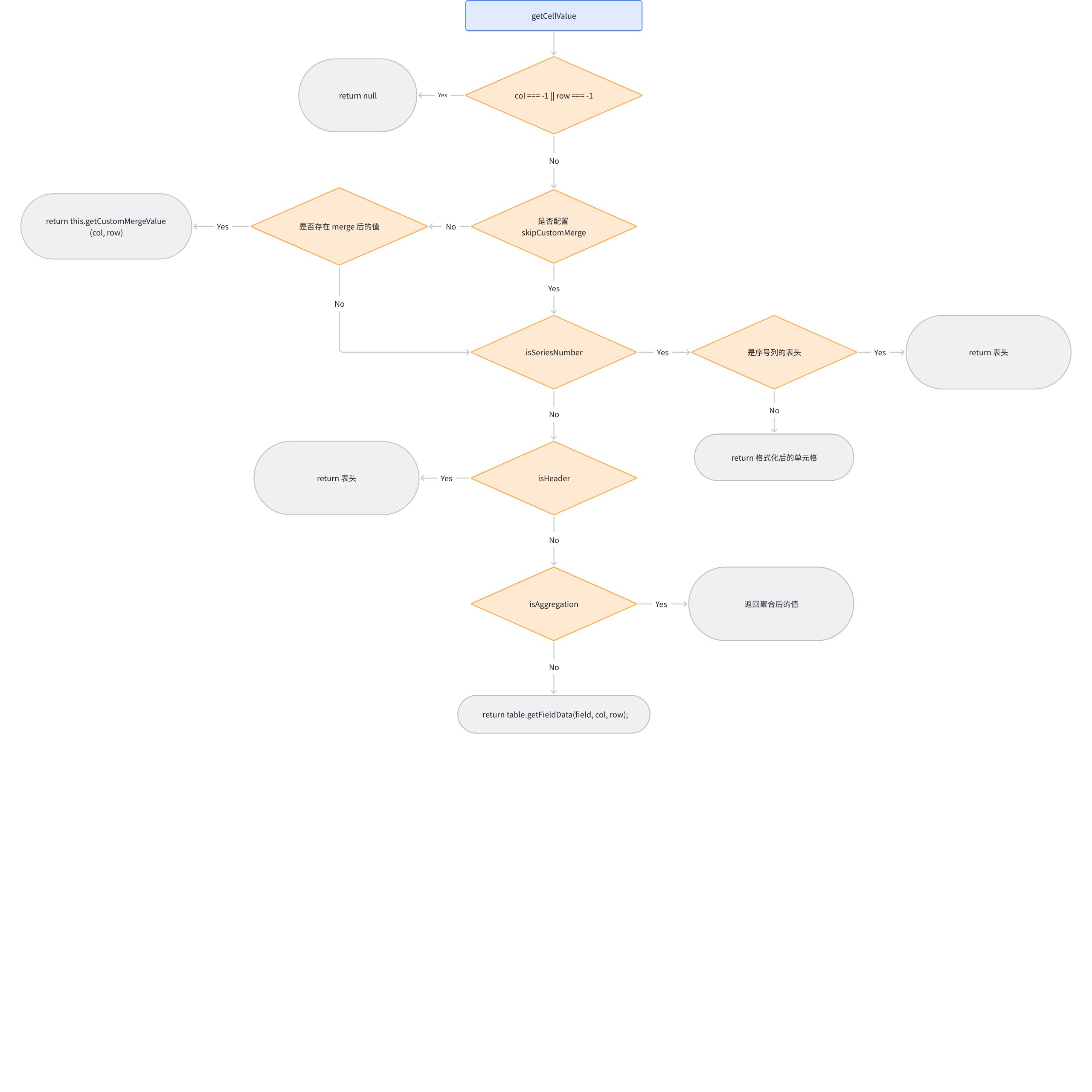
getFieldData
getFieldData 在内部调用了 DataSource.getField 方法,会用到 currentIndexedData 去获取实际的数据索引,从而从 records 中捞出实际的数据。
总结
-
模块化的数据处理:
@Visactor/VTable将透视表和基本表格的数据处理拆成了两部分,基本表格使用 DataSource 和 CachedDataSource,透视表使用更加复杂的 DataSet 类。这样做使得后续能够更加方便的调整; -
数据源抽象:ListTable 内部通过 DataSource 和 CachedDataSource 对数据进行抽象,将所有的逻辑放到模块内部,降低数据处理时的心智负担,实现低耦合;
-
高效的数据处理:由于
@Visactor/VTable基于 Canvas 进行渲染,所以在对数据进行更新时不能像原生DOM一样操作。 ListTable 通过计算出实际需要更新和添加的行,十分巧妙的避免了不必要的渲染,完成高效的数据处理。
本文档由以下人员提供
taiiiyang(https://github.com/taiiiyang)