


概述
数据处理是数据可视化的核心步骤之一。这一节将介绍 PivotTable 怎么组织、处理数据,让数据能支持高效渲染 PivotTable 的同时,又兼备 PivotTable 数据分析能力
自动组织维度树
需求背景
沿用我们 的图:
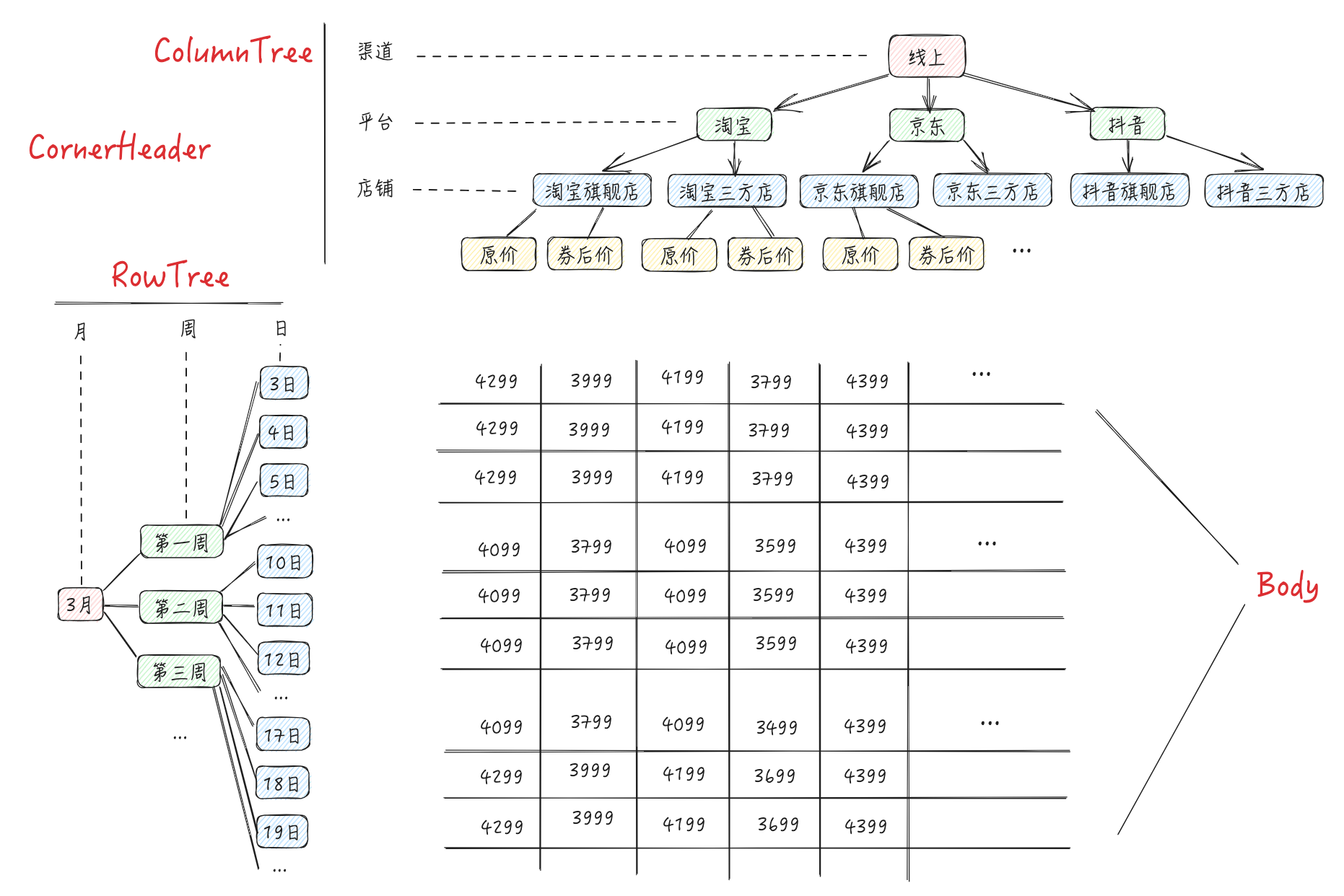
假设我们想实现这样一个多维表格,一般来说,我们期望业务方传进来的参数是:
-
组织好的维度树 RowTree、ColumnTree(类似 中的
timeTree和channelTree) -
在各个维度下、各个指标的具体数据 Records
理论上能实现,但缺点也很明显:需要业务方自行将数据组装成这个结构,接入成本较高。我们期望业务方只要传简洁的 Records 加一些简单的配置,我们就能自行解析数据、渲染成多维表格。比如传进来的 Records 是这种从 db 里查到的原始数据:
const records = [
    {
        channel: "线上",
        platform: "淘宝",
        shop: "淘宝旗舰店",
        month: 3,
        day: 2,
        curr_price: 3999
    },
    {
        channel: "线上",
        platform: "京东",
        shop: "京东三方店",
        month: 3,
        day: 3,
        origin_price: 4399,
    },
    ...
]
实现思路
分析
带着上述背景和目标,可能容易产生一些疑问:
-
怎么通过原始数据生成
rowTree、columnTree? -
答:分组聚合。类似
SQL中的group,理论上我们可以从records中通过类似group的方式梳理出各个维度的值(eg. 分组聚合出platform维度下有"淘宝" | "京东" | "抖音"三个维度值) -
怎么保证时间复杂度最低,在
records数据量大的情况下追求性能?
思路
- 约定用户传进来的数据 & 数据结构
const datasetOptions = {
  // 原始数据
  records: [
    {
      channel: '线上',
      platform: '淘宝',
      shop: '淘宝期间店',
      month: 3,
      week: 1,
      day: 3,
      origin_price: 4399,
    },
    {
      channel: '线上',
      platform: '淘宝',
      shop: '淘宝三方店',
      month: 3,
      week: 1,
      day: 4,
      curr_price: 4099
    }
    ...
  ],
  // rowTree 和 columnTree 中各维度层次在原始数据中的key
  columns: ['channel', 'platform', 'shop'],
  rows: ['month', 'week', 'day'],
  // 指标在 原始数据 中的key
  indicatorKeys: ['origin_price', 'curr_price']
};
-
任务
-
收集维度成员(eg.
platform维度下有"淘宝" | "京东" | "抖音"三个成员) -
组装出
rowTree、columnTree -
渲染时,从
records中快速查到单元格对应数据(如下图)
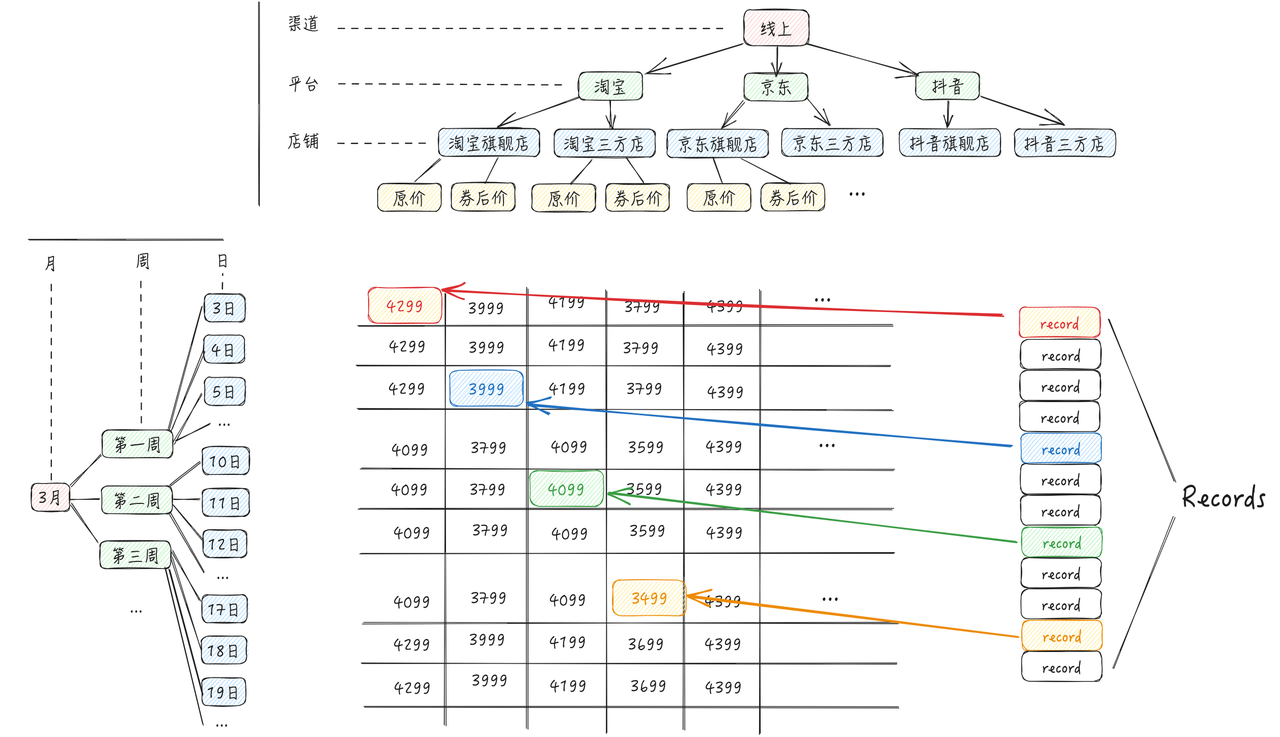
单从已知的任务看,理论上:
-
遍历一次
records是能完成 “收集维度成员” 这个任务的;根据收集好的维度成员和用户传进来的columns、rows、indicatorKeys,理论上是能组装出 rowTree、columnTree 的 -
但是怎么知道这些维度的父子关系呢?我怎么知道
shop维度其实是platform维度的子维度? -
让用户传
columns的时候,父维度排序上比子维度靠前即可,eg:
// ❌ bad
const options = {
  columns: ['channel', 'shop', 'platform'],
  ...
};

// ✅ good
const options = {
  columns: ['channel', 'platform', 'shop'],
  ...
};
-
但“渲染时,从
records中快速查到单元格对应数据”这个比较令人头疼,假设我们知道了单元格的 行维度 + 列维度,要实现getCellValue(col: number, row: number)函数。难道又要再遍历一次records?这可就太麻烦了 -
最高效的方法:借助
**hash map**的能力,将查的时间复杂度降低到O(1)。那怎么设计hash map的结构呢?
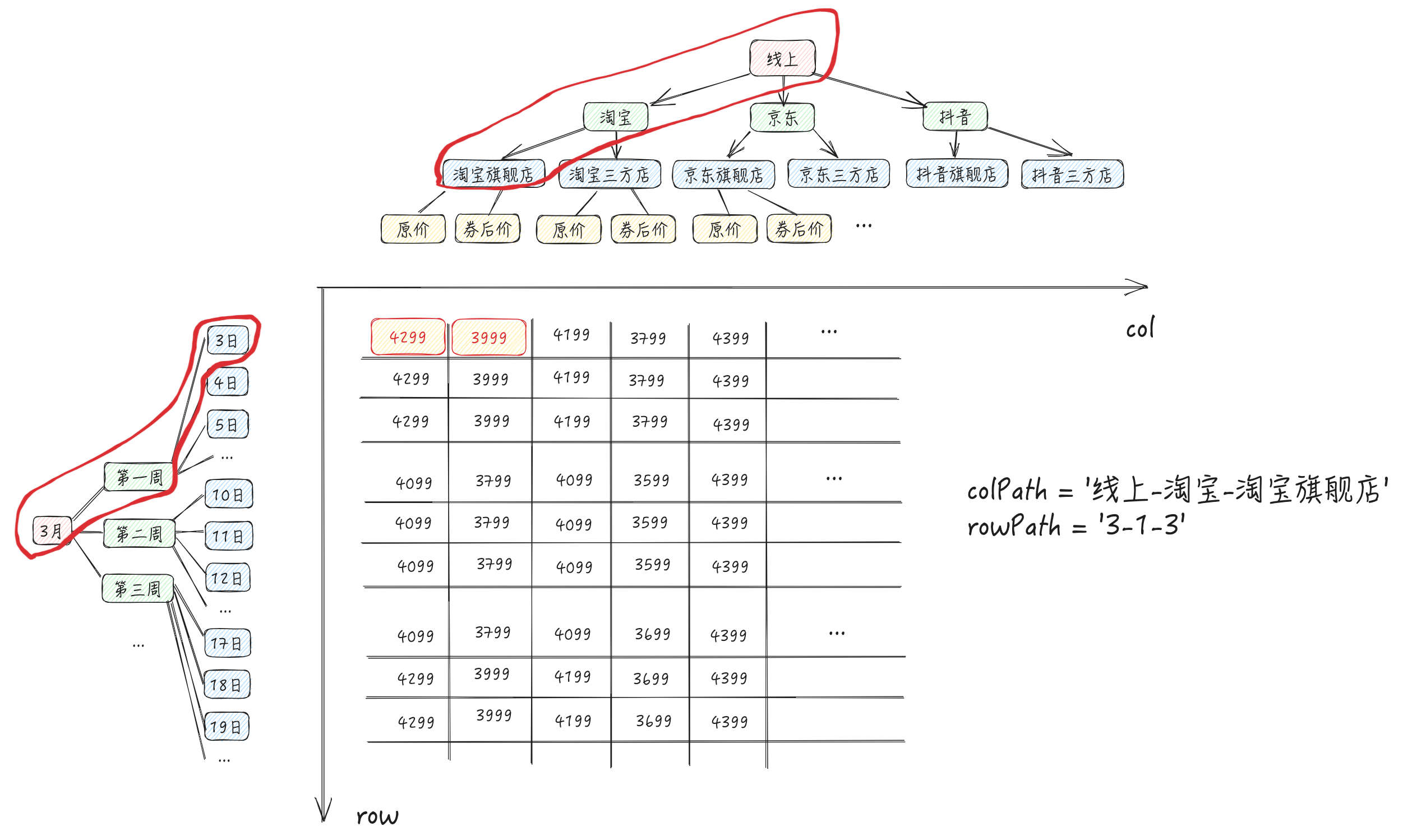
其实数据区就是一个二维矩阵,则用 (row, col) 能定位每个单元格的位置。所以如果我们有一个二维 hash map 的,其结构大概如下,就能用来查单元格数据了
// HashMap 的第一层 key 为 row,第二层 key 为 col
type HashMap = Record<string, Record<string, IndicatorValue[]>>

// 指标值
type IndicatorValue = {
    indicatorKey: string;
    value: string;
}
在我们这个需求中,怎么定义hash map两层 key 的结构呢?为了保证唯一性,我们可以用rowTree、columnTree 中从 root 到叶子节点的 path组成的字符串做 key(如下图和代码)
// 指标值
type IndicatorValue = {
    indicatorKey: string;
    value: string;
}

// TreeMap 的第一层 key 为 row-path,第二层 key 为 col-path
type TreeMap = Record<string, Record<string, IndicatorValue[]>>

// 数据维度 tree 对象
const tree: TreeMap = {
    '3-1-3': {
        '线上-淘宝-淘宝旗舰店': [
            {
                indicatorKey: "origin_price",
                value: '4299'
            }
            {
                indicatorKey: "curr_price",
                value: '3999'
            }
        ]
    }
}
数据解析流程
有了上面的分析,我们捋一下数据解析流程
遍历
遍历数据过程中需要维护的变量:
// 列维度成员组成的数组
colKeys: string[][]
// 行维度成员组成的数组
rowKeys: string[][]
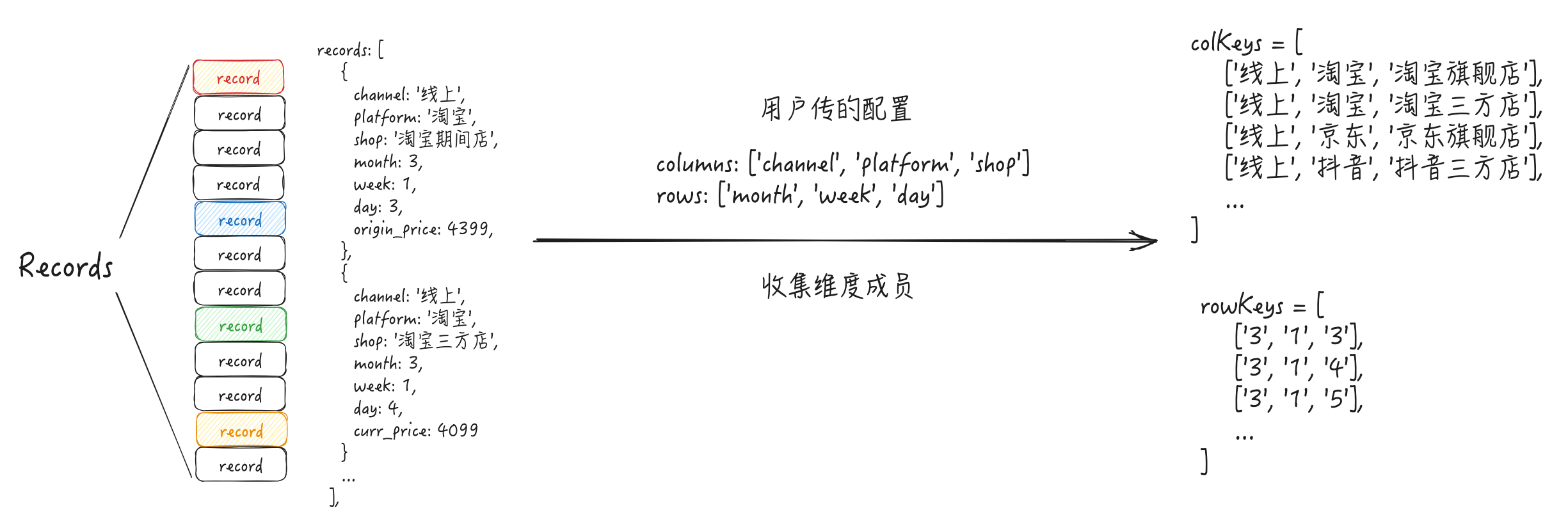
遍历数据的过程中也会生成维度 tree 对象(也就是上文说的hash map; 为了统一称呼,下文统一称其为“维度 tree 对象”)
// 数据维度 tree 对象
// 第一层 key 实际就是 colKeys 的元素,再 join 得到的字符串
// 第二层 key 为 rowKeys 的元素经过 join 得到的字符串
tree: Record<string, Record<string, IndicatorValue[]>> = {
    '3-1-3': {
        '线上-淘宝-淘宝旗舰店': [
            {
                indicatorKey: "origin_price",
                value: '4299'
            }
            {
                indicatorKey: "curr_price",
                value: '3999'
            }
        ]
    }
}
查找
有了维度 tree 对象之后,渲染时,就能用它从 records 中快速查到单元格对应数据了
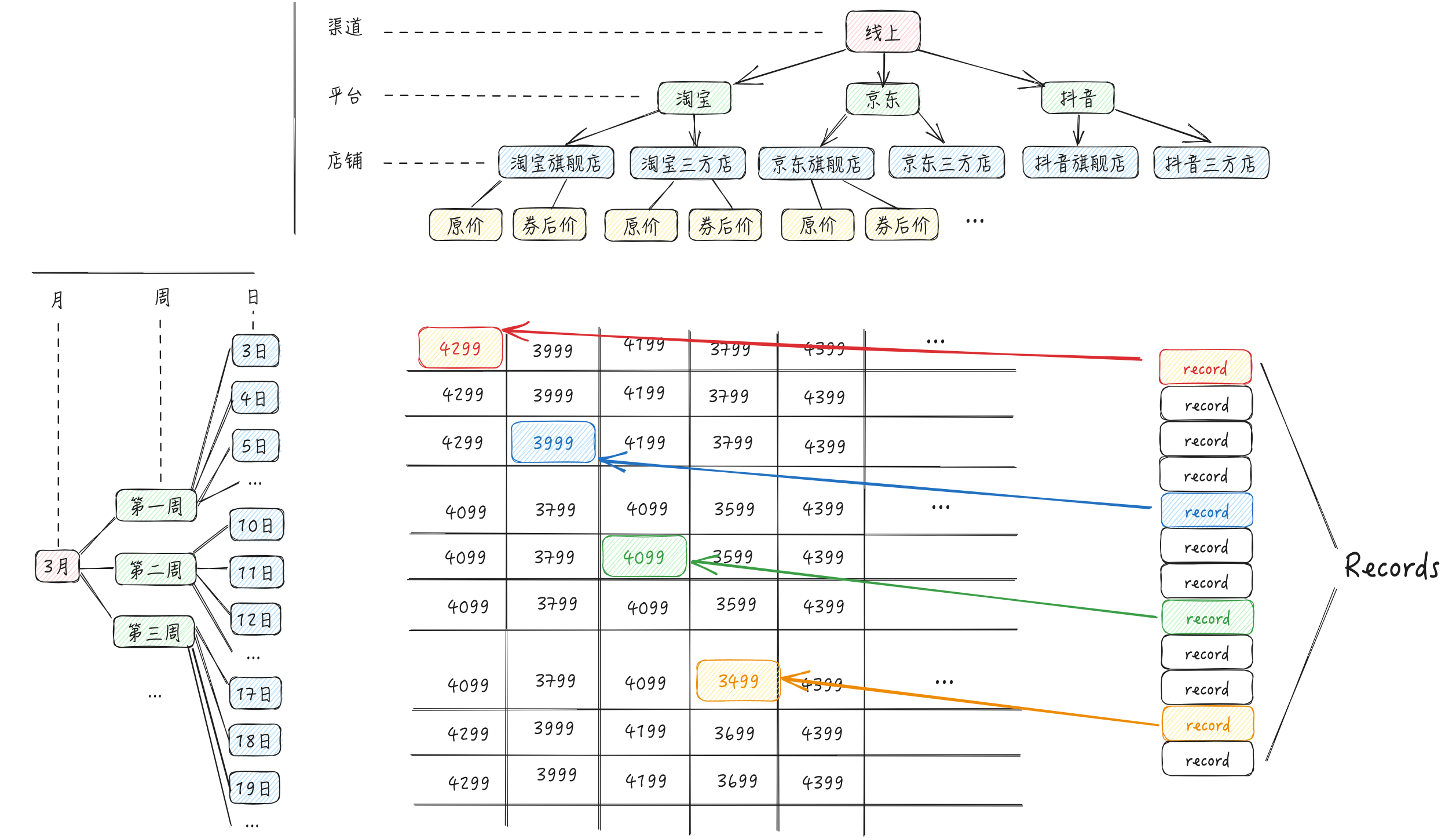
源码
按上述分析流程,我们一起看下源码是怎么实现的
-
setRecords:数据处理的入口方法
-
processRecords:处理数据,遍历所有条目
-
processRecord:处理单条数据,我们刚分析流程基本都在这个函数中实现了
遍历
在之前的设想中,我们设想维度 path 会是 '线上-淘宝-淘宝旗舰店' 这种,会有问题,因为维度成员也可能含有 '-' 这个字符串。
源码中用String.fromCharCode(0)作为维度 path 的分隔符,即\u0000。在 JavaScript 中,\u0000表示 Unicode 编码为U+0000的字符,也就是 **空字符(Null Character),**这个字符通常用于表示字符串的结束或占位符,但在实际呈现时,它通常不会被显示出来。在这里主要用来保证维度 path 字符串的唯一性
class Dataset {
    colKeys: string[][] = [];
    rowKeys: string[][] = [];
    private colFlatKeys: Record<string, number> = {}; // 记录某个colKey已经被添加到colKeys
    private rowFlatKeys: Record<string, number> = {}; // 记录某个rowKey已经被添加到rowKeys
    tree: Record<string, Record<string, Aggregator[]>> = {};

    stringJoinChar = String.fromCharCode(0); // 维度 path 的分隔符

    setRecords(records: any[] | Record<string, any[]>) {
        this.processRecords();

        ...
    }

    // 处理数据, 遍历所有条目
    private processRecords() {
        ...
        for (let i = 0, len = this.records.length; i < len; i++) {
            const record = this.records[i];

            ...
            this.processRecord(record);
        }
    }

    // 处理单条数据
    private processRecord(record: any, assignedIndicatorKey?: string) {
        ...

        const colKeys: { colKey: string[]; indicatorKey: string | number }[] = [];
        const rowKeys: { rowKey: string[]; indicatorKey: string | number }[] = [];

        // 收集维度成员
        const rowKey: string[] = [];
        rowKeys.push({ rowKey, indicatorKey: assignedIndicatorKey });
        for (let l = 0, len1 = this.rows.length; l < len1; l++) {
            const rowAttr = this.rows[l];
            if (rowAttr in record) {
                this.rowsHasValue[l] = true;
                **rowKey.push(record[rowAttr]);**
            }
        }

        const colKey: string[] = [];
        colKeys.push({ colKey, indicatorKey: assignedIndicatorKey });
        for (let n = 0, len2 = this.columns.length; n < len2; n++) {
            const colAttr = this.columns[n];
            if (colAttr in record) {
                this.columnsHasValue[n] = true;
                **colKey.push(record[colAttr]);**
            }
        }

        for (let row_i = 0; row_i < rowKeys.length; row_i++) {
            const rowKey = rowKeys[row_i].rowKey;
            ...

            for (let col_j = 0; col_j < colKeys.length; col_j++) {
                const colKey = colKeys[col_j].colKey;

                // 生成 flatRowKey,将用于维度tree对象的key
                **const flatRowKey = rowKey.join(this.stringJoinChar);**
**                const flatColKey = colKey.join(this.stringJoinChar);**

                ...

                if (rowKey.length !== 0) {
                  if (!this.rowFlatKeys[flatRowKey]) {
                    **this.rowKeys.push(rowKey);**
                    this.rowFlatKeys[flatRowKey] = 1;
                  }
                }
                if (colKey.length !== 0) {
                  if (!this.colFlatKeys[flatColKey]) {
                    **this.colKeys.push(colKey);**
                    this.colFlatKeys[flatColKey] = 1;
                  }
                }

                if (!this.tree[flatRowKey]) {
                  this.tree[flatRowKey] = {};
                }

                // 生成维度 tree 对象
                if (!this.tree[flatRowKey]?.[flatColKey]) {
                  this.tree[flatRowKey][flatColKey] = [];
                }

                const toComputeIndicatorKeys = this.indicatorKeysIncludeCalculatedFieldDependIndicatorKeys;
                for (let i = 0; i < toComputeIndicatorKeys.length; i++) {
                    let needAddToAggregator = false;

                    ...

                    // 生成维度 tree 对象
                    if (needAddToAggregator) {
                        **this.tree[flatRowKey]?.[flatColKey]?.[i].push(record);**
                    }
                }
                ...

            }
        }

    }
}
组装生成
ArrToTree和ArrToTree1:将rowKeys和colKeys转为树形结构
private ArrToTree1(
    arr: string[][],
    rows: string[],
    indicators: (string | IIndicator)[] | undefined,
    ...
  ): {
     {
       value: string;
       dimensionKey: string;
       children: any[] | undefined
     }
  }[] {
    const result: any[] = []; // 结果
    const concatStr = this.stringJoinChar; // 连接符(随便写,保证key唯一性就OK)
    const map = new Map(); // 存储根节点 主要提升性能

    function addList(list: any, isGrandTotal: boolean) {
      const path: any[] = []; // 路径
      let node: any; // 当前节点
      list.forEach((value: any, index: number) => {
        path.push(value);
        const flatKey = path.join(concatStr);
        //id的值可以每次生成一个新的 这里用的path作为id 方便layout对象获取
        let item: { value: string; dimensionKey: string; children: any[] | undefined } = map.get(flatKey); // 当前节点
        if (!item) {
          item = {
            value,
            dimensionKey: rows[index],
            //树的叶子节点补充指标
            children:
              index === list.length - 1 && (indicators?.length ?? 0) >= 1
                ? indicators?.map(indicator => {
                    if (typeof indicator === 'string') {
                      return {
                        indicatorKey: indicator,
                        value: indicator
                      };
                    }
                    return {
                      indicatorKey: indicator.indicatorKey,
                      value: indicator.title
                    };
                  })
                : []
          };

          map.set(flatKey, item); // 存储路径对应的节点
          if (node) {
            node.children.push(item);
          } else {
            if (showGrandTotalsOnTop && isGrandTotal) {
              result.unshift(item);
            } else {
              result.push(item);
            }
          }
        }
        node = item; // 更新当前节点
      });
    }

    arr.forEach(item => addList(item, false));
    ...

    return result;
}
查找
PivotTable可以通过 pivotTable.getCellValue 等方法获取从dataset模块获取单元格的值,此类方法最终都会调用 dataset.getAggregator 方法
可以看到是通过 flatRowKey + flatColKey + indicatorIndex直接在维度tree对象读取,非常方便,时间复杂度几乎可以视为 O(1)
getAggregator(
    rowKey: string[] | string = [],
    colKey: string[] | string = [],
    indicator: string,
    considerChangedValue: boolean = true,
    indicatorPosition?: { position: 'col' | 'row'; index?: number }
  ): IAggregator {
    const indicatorIndex = this.indicatorKeys.indexOf(indicator);

    ...

    const agg = this.tree[flatRowKey]?.[flatColKey]?.[indicatorIndex];

    return agg
}
数据更新的情况
-
增:树形展示场景下,如果需要动态插入子节点的数据,可能会用到
setTreeNodeChildren接口 -> 调用addRecords接口 -> 触发processRecord -
改:在编辑表格场景下,单元格的值可能会更新,会调用
pivotTable.changeCellValues和pivotTable.changeCellValue更改单元格数据 -
上述方法除了会触发宽高重新计算外,在数据处理上,最后会触发
dataset.changeRecordFieldValue方法(如下代码)。可以看到会先更新records;然后再调this.processRecords()重新开始遍历records,重新生成维度tree对象
changeRecordFieldValue(fieldName: string, oldValue: string | number, value: string | number) {
  ...

  for (let i = 0, len = this.records.length; i < len; i++) {
      const record = this.records[i];
      if (record[fieldName] === oldValue) {
        **record[fieldName] = value;**
      }
  }

  this.rowFlatKeys = {};
  this.colFlatKeys = {};
  this.tree = {};
  **this.processRecords();**
}
数据分析
需求背景
多维表格的核心功能之一就是数据分析,能帮助用户分析出各种场景指标以及对比,帮助业务分析推动决策。以下是 PivotTable 具备的数据分析能力
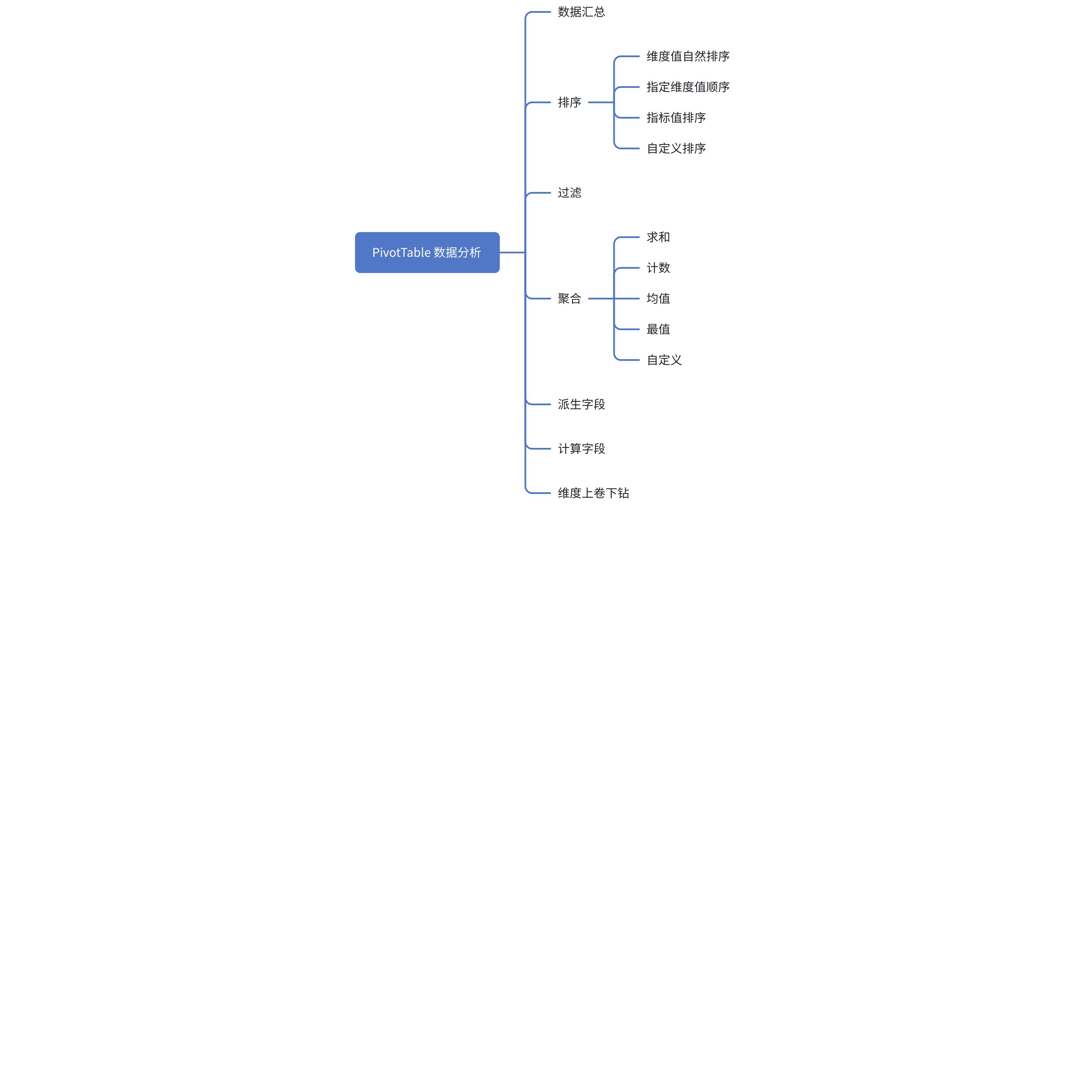
需求分析
- 在上小节「自动组织维度树」中,我们设想的
维度tree对象值为IndicatorValue[]类型。为了实现聚合、计算字段的功能,维度tree对象值的数据结构需要重新设计。应该是什么数据结构呢?如何实现遍历**Records**的时候边统计这些聚合数据呢?这其实是这一小节的核心设计之一
// 我们之前设想据维度 tree 对象
const tree = {
    '3-1-3': {
        '线上-淘宝-淘宝旗舰店': [
            {
                indicatorKey: "origin_price",
                value: '4299'
            }
            {
                indicatorKey: "curr_price",
                value: '3999'
            }
        ]
    }
}
- 过滤、派生字段功能在遍历
Records之前就能实现。根据约定的过滤规则,先将不需要的数据从Records剔除,不影响后面的其他计算
根据上面的分析,为了实现数据分析功能,数据解析流程可能会变更如下:
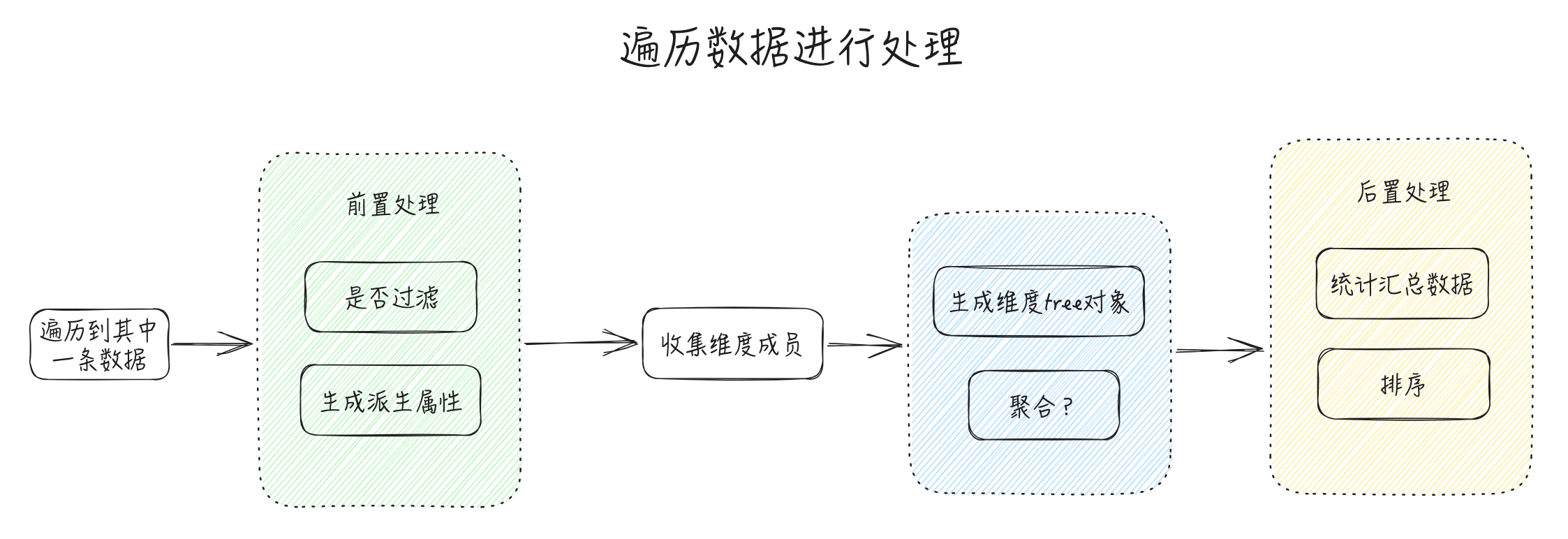
源码 & 实现
带着上述分析和疑问,我们一起看下源码是怎么实现的
这些逻辑基本还是分布在 setRecords、processRecords、processRecord 这三个方法中
-
setRecords:数据处理的入口方法
-
processRecords:处理数据,遍历所有条目
-
processRecord:处理单条数据
过滤
源码如下,应该还好理解
export class Dataset {
    // 过滤规则
    filterRules?: FilterRules;

    // 明细数据
    records?: any[] | Record<string, any[]>;
    filteredRecords?: any[] | Record<string, any[]>;

    // 处理数据, 遍历所有条目
    private processRecords() {
        let isNeedFilter = false;
        if ((this.filterRules?.length ?? 0) >= 1) {
          isNeedFilter = true;
        }

        for (let i = 0, len = this.records.length; i < len; i++) {
            const record = this.records[i];
            // 如果 this.filterRecord(record) 为false,这条原始数据就被过滤掉了,不进入后面的数据处理流程
            if (!isNeedFilter || **this.filterRecord(record)**) {
                (this.filteredRecords as any[]).push(record);
                this.processRecord(record);
            }
          }
    }

    // 遍历过滤规则,有一条命中就会被过滤掉
    private filterRecord(record: any): boolean {
        let isReserved = true;
        if (this.filterRules) {
            for (let i = 0; i < this.filterRules.length; i++) {
                const filterRule = this.filterRules[i];
                if (filterRule.filterKey) {
                    const filterValue = record[filterRule.filterKey];
                    if (filterRule.filteredValues?.indexOf(filterValue) === -1) {
                        isReserved = false;
                        break;
                    }
                } else if (!filterRule.filterFunc?.(record)) {
                    isReserved = false;
                    break;
                }
            }
        }
        return isReserved;
    }
}
派生字段
export class Dataset {
    // 派生字段规则
    derivedFieldRules?: DerivedFieldRules;

    // 处理单条数据
    private processRecord(record: any, assignedIndicatorKey?: string) {
        this.derivedFieldRules?.forEach((derivedFieldRule: DerivedFieldRule, i: number) => {
            if (derivedFieldRule.fieldName && derivedFieldRule.derivedFunc) {
                // 根据派生字段规则的 fieldName 和 函数,生成字段数据,写入 record 中
                record[derivedFieldRule.fieldName] = derivedFieldRule.derivedFunc(record);
            }
        });

    }
}
聚合
Aggregator类
- 根据不同的聚合类型
AggregationType,基于Aggregator类实现各自的聚合类
export enum AggregationType {
  RECORD = 'RECORD',
  NONE = 'NONE', //不做聚合 只获取其中一条数据作为节点的record 取其field
  SUM = 'SUM',
  MIN = 'MIN',
  MAX = 'MAX',
  AVG = 'AVG',
  COUNT = 'COUNT',
  CUSTOM = 'CUSTOM',
  RECALCULATE = 'RECALCULATE' // 计算字段
}

// packages/vtable/src/ts-types/dataset/aggregation.ts
export interface IAggregator {
  records: any[];  // 缓存聚合值的records集合,为后续跟踪提供数据依据
  value: () => any; // 获取聚合值
  push: (record: any) => void; // 将数据记录添加到聚合器中,用于计算聚合值
  deleteRecord: (record: any) => void; // 从聚合器中删除记录,并更新聚合值。eg. 调用vtable的删除接口deleteRecords会调用该接口
  updateRecord: (oldRecord: any, newRecord: any) => void; // 更新数据记录,并更新聚合值。eg. 调用接口updateRecords会调用该接口
  recalculate: () => any; // 重新计算聚合值。eg. 目前复制粘贴单元格值会调用该方法。
  formatValue?: (col?: number, row?: number, table?: BaseTableAPI) => any; // 格式化后的聚合值
  formatFun?: () => any; // 格式化函数
  clearCacheValue: () => any; // 清空缓存值
  reset: () => void; // 重置聚合器
}

export abstract class Aggregator implements IAggregator {
  isAggregator?: boolean = true;
  isRecord?: boolean = true; //是否需要维护records 将数据源都记录下来
  records: any[] = [];
  type?: string;
  key: string;
  field?: string | string[];
  formatFun?: any;
  _formatedValue?: any;

  constructor(config: { key: string; field: string | string[]; formatFun?: any; isRecord?: boolean }) {
    this.key = config.key;
    this.field = config.field;
    this.formatFun = config.formatFun;
    this.isRecord = config.isRecord ?? this.isRecord;
  }
  abstract push(record: any): void;
  abstract deleteRecord(record: any): void;
  abstract updateRecord(oldRecord: any, newRecord: any): void;
  abstract value(): any;
  abstract recalculate(): any;
  clearCacheValue() {
    this._formatedValue = undefined;
  }
  formatValue(col?: number, row?: number, table?: BaseTableAPI) {
     ...
  }
  reset() {
    this.records = [];
    this.clearCacheValue();
  }
}

// 基于 Aggregator 实现各自的聚合类
export class SumAggregator extends Aggregator {
    ...
}
export class CountAggregator extends Aggregator {
    ...
}
...
维度tree对象的值,其实就是Aggregator[]
tree: Record<string, Record<string, Aggregator[]>> = {};
我们选AggregationType.SUM和AggregationType.RECALCULATE(计算字段)来具体分析下实现流程
SumAggregator
大概流程如下:
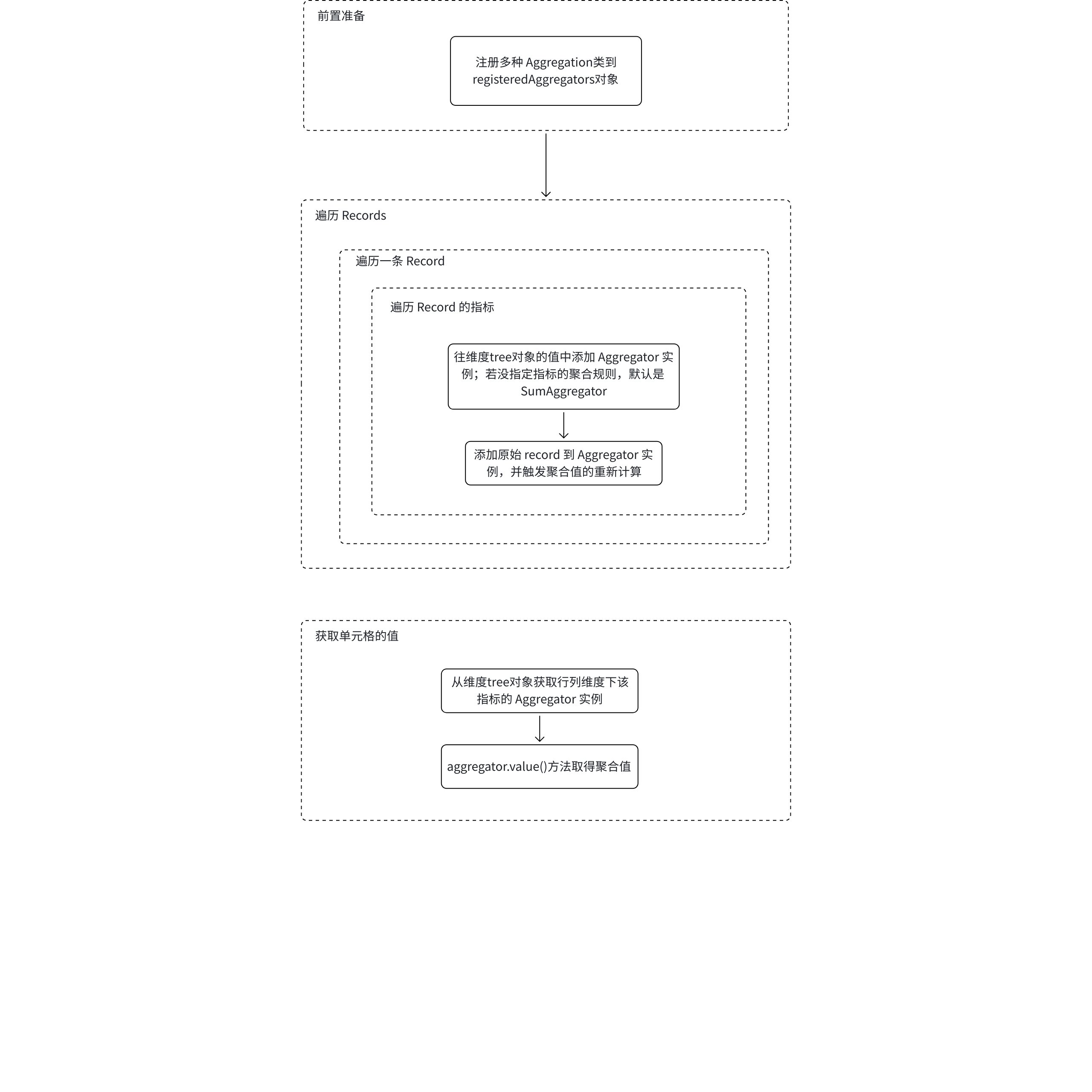
// packages/vtable/src/ts-types/dataset/aggregation.ts
export const registeredAggregators: {
  [key: string]: {
    new (args: {
      key?: string;
      field: string | string[];
      aggregationFun?: any;
      formatFun?: any;
      isRecord?: boolean;
      needSplitPositiveAndNegative?: boolean;
      calculateFun?: any;
      dependAggregators?: any;
      dependIndicatorKeys?: string[];
    }): Aggregator;
  };
} = {};

// packages/vtable/src/dataset/dataset.ts
export class Dataset {
    // 聚合规则
    aggregationRules?: AggregationRules;

     // 将聚合类型注册收集到 registeredAggregators 对象,方便后面调用
    registerAggregator(type: string, aggregator: any) {
        registeredAggregators[type] = aggregator;
    }

    // 将聚合类型注册。 在 constructor 一开始就会执行
    registerAggregators() {
        this.registerAggregator(AggregationType.RECORD, RecordAggregator);
        this.registerAggregator(AggregationType.SUM, SumAggregator);
        this.registerAggregator(AggregationType.COUNT, CountAggregator);
        this.registerAggregator(AggregationType.MAX, MaxAggregator);
        this.registerAggregator(AggregationType.MIN, MinAggregator);
        this.registerAggregator(AggregationType.AVG, AvgAggregator);
        this.registerAggregator(AggregationType.NONE, NoneAggregator);
        this.registerAggregator(AggregationType.RECALCULATE, RecalculateAggregator);
        this.registerAggregator(AggregationType.CUSTOM, CustomAggregator);
    }


    // 处理单条数据
    private processRecord(record: any, assignedIndicatorKey?: string) {
        ...
        const toComputeIndicatorKeys = this.indicatorKeysIncludeCalculatedFieldDependIndicatorKeys;
        for (let i = 0; i < toComputeIndicatorKeys.length; i++) {

            ...
            // aggRule 有可能为空,具体看是什么指标字段
            const aggRule = this.getAggregatorRule(toComputeIndicatorKeys[i]);
            let needAddToAggregator = false;

            ...

            // 如果这个 indicatorKey 在 record 中,就会触发下面的逻辑
            toComputeIndicatorKeys[i] in record && (needAddToAggregator = true);
            if (!this.tree[flatRowKey]?.[flatColKey]?.[i] && needAddToAggregator) {
                // 若这个 indicatorKey 没指定 aggRule,就默认是 AggregationType.SUM
                // 往维度tree对象的值中添加 Aggregator 实例
                this.tree[flatRowKey][flatColKey][i] = new registeredAggregators[
                    **aggRule?.aggregationType ?? AggregationType.SUM**
                ]({
                    key: toComputeIndicatorKeys[i],
                    field: aggRule?.field ?? toComputeIndicatorKeys[i],
                    aggregationFun: aggRule?.aggregationFun,
                    formatFun:
                        aggRule?.formatFun ??
                        (
                          this.indicators?.find((indicator: string | IIndicator) => {
                              if (typeof indicator !== 'string') {
                                  return indicator.indicatorKey === toComputeIndicatorKeys[i];
                              }
                              return false;
                          }) as IIndicator
                        )?.format
              });
            }

            if (needAddToAggregator) {
                // 并调用 Aggregator 实例的 push 方法,往 Aggregator.records 中存原始数据
                this.tree[flatRowKey]?.[flatColKey]?.[i].push(record);
            }
        }
    }
}

// packages/vtable/src/ts-types/dataset/aggregation.ts
export class SumAggregator extends Aggregator {
    type: string = AggregationType.SUM;
    sum = 0;
    ...

    push(record: any): void {
        if (record) {
            if (this.isRecord && this.records) {
                if (record.isAggregator) {
                    this.records.push(...record.records);
                } else {
                    this.records.push(record);
            }
        }

        ...
        const value = parseFloat(record[this.field]);
        this.sum += value;
        if (this.needSplitPositiveAndNegativeForSum) {
          if (value > 0) {
            this.positiveSum += value;
          } else if (value < 0) {
            this.nagetiveSum += value;
          }
        }

        this.clearCacheValue();
    }

    // 获取 sum 值
    value() {
        return this.records?.length >= 1 ? this.sum : undefined;
    }

  ...
}
计算字段
计算字段的 Aggregator类是RecalculateAggregator。处理流程也和 SumAggregator 的流程很类似
export class Dataset {
    // 计算字段规则
    calculatedFieldRules?: CalculateddFieldRules;
    /** 计算字段 */
    calculatedFiledKeys?: string[];
    calculatedFieldDependIndicatorKeys?: string[];

    // 处理单条数据
    private processRecord(record: any, assignedIndicatorKey?: string) {
        ...
        const toComputeIndicatorKeys = this.indicatorKeysIncludeCalculatedFieldDependIndicatorKeys;
        for (let i = 0; i < toComputeIndicatorKeys.length; i++) {
            // 遍历计算字段key
            if (this.calculatedFiledKeys.indexOf(toComputeIndicatorKeys[i]) >= 0) {
                // 找到计算字段对应的计算规则
                const calculatedFieldRule = this.calculatedFieldRules?.find(rule => rule.key === toComputeIndicatorKeys[i]);

                if (!this.tree[flatRowKey]?.[flatColKey]?.[i]) {
                    // 往 维度tree 添加新 RECALCULATE Aggregator 实例
                    this.tree[flatRowKey][flatColKey][i] = new registeredAggregators[AggregationType.RECALCULATE]({
                    key: toComputeIndicatorKeys[i],
                    field: toComputeIndicatorKeys[i],
                    isRecord: true,
                    formatFun: (
                      this.indicators?.find((indicator: string | IIndicator) => {
                        if (typeof indicator !== 'string') {
                          return indicator.indicatorKey === toComputeIndicatorKeys[i];
                        }
                        return false;
                      }) as IIndicator
                    )?.format,
                    calculateFun: calculatedFieldRule?.calculateFun,
                    dependAggregators: this.tree[flatRowKey][flatColKey],
                    dependIndicatorKeys: calculatedFieldRule?.dependIndicatorKeys
                  });
                }

                // 将依赖的原始数据 record 存进 RECALCULATE Aggregator.records 中
                this.tree[flatRowKey]?.[flatColKey]?.[i].push(record);
            }
        }
    }
}

// packages/vtable/src/ts-types/dataset/aggregation.ts
export class RecalculateAggregator extends Aggregator {
    type: string = AggregationType.RECALCULATE;
    isRecord?: boolean = true;
    declare field?: string;
    calculateFun: Function;
    fieldValue?: any;
    dependAggregators: Aggregator[];
    dependIndicatorKeys: string[];

    ...

    push(record: any): void {
        if (record && this.isRecord && this.records) {
            if (record.isAggregator) {
                this.records.push(...record.records);
            } else {
                this.records.push(record);
            }
        }
        this.clearCacheValue();
    }

    // 获取计算字段的值
    value() {
        if (!this.fieldValue) {
            // 获取依赖的 Aggregator 的值
            const aggregatorValue = _getDependAggregatorValues(this.dependAggregators, this.dependIndicatorKeys);
            // 再用 calculateFun 算出计算字段的值
            this.fieldValue = this.calculateFun?.(aggregatorValue, this.records, this.field);
        }
        return this.fieldValue;
    }
}
汇总
这个处理相当麻烦 ...
export class Dataset {
    // 汇总配置
    totals?: Totals;
    // 全局统计各指标的极值
    indicatorStatistics: { max: Aggregator; min: Aggregator; total: Aggregator }[] = [];
    // 缓存rows对应每个值是否为汇总字段
    private rowsIsTotal: boolean[] = [];
    private colsIsTotal: boolean[] = [];
    private colGrandTotalLabel: string;
    private colSubTotalLabel: string;
    private rowGrandTotalLabel: string;
    private rowSubTotalLabel: string;
    // 记录用户传入的汇总数据
    totalRecordsTree: Record<string, Record<string, Aggregator[]>> = {};

    setRecords(records: any[] | Record<string, any[]>) {
        ...
        // 处理汇总. 在 this.processRecords() 之后;在排序之前
        this.totalStatistics();
    }


    // 汇总小计
    totalStatistics() {
        // 如果 row 或 column有汇总配置
        if (...) {
            const rowTotalKeys: string[] = [];

            // 遍历维度 tree 中的每个行维度、列维度
            Object.keys(that.tree).forEach(flatRowKey => {
                const rowKey = flatRowKey.split(this.stringJoinChar);
                Object.keys(that.tree[flatRowKey]).forEach(flatColKey => {
                    // 如果 row 有小计
                    if (...) {
                        for (let i = 0, len = that.totals?.row?.subTotalsDimensions?.length; i < len; i++) {
                            // 取有小计配置的 row 维度
                            const dimension = that.totals.row.subTotalsDimensions[i];
                            const dimensionIndex = that.rows.indexOf(dimension);

                            const rowTotalKey = rowKey.slice(0, dimensionIndex + 1);
                            if (this.rowHierarchyType !== 'tree') {
                                // 如果是tree的情况则不追加小计单元格值
                                rowTotalKey.push(that.rowSubTotalLabel);
                            }

                            if (!this.tree[flatRowTotalKey]) {
                                this.tree[flatRowTotalKey] = {};
                                rowTotalKeys.push(flatRowTotalKey);
                            }
                            if (!this.tree[flatRowTotalKey][flatColKey]) {
                                this.tree[flatRowTotalKey][flatColKey] = [];
                            }

                            // 和之前处理聚合的逻辑类似
                            // 会往维度tree该行列维度中添加 Aggreator 实例
                            const toComputeIndicatorKeys = this.indicatorKeysIncludeCalculatedFieldDependIndicatorKeys;
                            for (let i = 0; i < toComputeIndicatorKeys.length; i++) {
                                if (!this.tree[flatRowTotalKey][flatColKey][i]) {
                                    if (this.calculatedFiledKeys.indexOf(toComputeIndicatorKeys[i]) >= 0) {

                                        ...
                                        const aggRule = this.getAggregatorRule(toComputeIndicatorKeys[i]);
                                        this.tree[flatRowTotalKey][flatColKey][i] = new registeredAggregators[                                            aggRule?.aggregationType ?? AggregationType.SUM                                        ]({
                                            key: toComputeIndicatorKeys[i],
                                            field: aggRule?.field ?? toComputeIndicatorKeys[i],
                                            formatFun:
                                              aggRule?.formatFun ??
                                              (
                                                this.indicators?.find((indicator: string | IIndicator) => {
                                                  if (typeof indicator !== 'string') {
                                                    return indicator.indicatorKey === toComputeIndicatorKeys[i];
                                                  }
                                                  return false;
                                                }) as IIndicator
                                              )?.format
                                        });
                                    }
                                 }
                                 // 这一步有点意思,会往维度tree中 flatRowTotalKey 维度的 aggreator 添加所有flatRowKey下的 aggreator
                                 if (flatRowTotalKey !== flatRowKey) {
                                    this.tree[flatRowTotalKey][flatColKey][i].push(that.tree[flatRowKey]?.[flatColKey]?.[i]);
                                 }
                            }
                        }
                    }

                    // 如果 row 有总计配置, 也做类似的处理
                    if (that.totals?.row?.showGrandTotals || this.columns.length === 0) {
                        ...
                    }

                    colCompute(flatRowKey, flatColKey);
                })

                // 增加出来的rowTotalKeys 再遍历一次 汇总小计的小计 如 东北小计(row)-办公用品小计(col)所指单元格的值
                rowTotalKeys.forEach(flatRowKey => {
                    Object.keys(that.tree[flatRowKey]).forEach(flatColKey => {
                        // 计算每一行的所有列的汇总值
                        colCompute(flatRowKey, flatColKey);
                    })
                })

            })

            for (const flatRowKey in that.totalRecordsTree) {
                for (const flatColKey in that.totalRecordsTree[flatRowKey]) {
                    // 计算每一行的所有列的汇总值
                    colCompute(flatRowKey, flatColKey);
                }
            }
        }
    }
}
排序
对colKeys和rowKeys分别排序
export class Dataset {
    // 排序规则
    sortRules?: SortRules;

    colKeys: string[][] = [];
    rowKeys: string[][] = [];
    // 存储下未排序即初始normal下rowKeys和colKeys
    colKeys_normal: string[][] = [];
    rowKeys_normal: string[][] = [];

    setRecords(records: any[] | Record<string, any[]>) {
        this.processRecords(); // 这里收集了维度成员

        ...
        this.rowKeys_normal = this.rowKeys.slice();
        this.colKeys_normal = this.colKeys.slice();

        this.sortKeys();
    }

    // 根据排序规则 对维度keys排序
    sortKeys() {
        this.colKeys = this.colKeys_normal.slice();
        this.rowKeys = this.rowKeys_normal.slice();
        if (!this.sorted) {
            this.sorted = true;

            // 排序
            this.rowKeys.sort(this.arrSort(this.rows, true));
            const sortfun = this.arrSort(this.columns, false);
            this.colKeys.sort(sortfun);
        }
    }

    // 综合配置的多条排序规则,生成生成排序函数
    arrSort(fieldArr: string[], isRow: boolean) {
        ...
    }
}
数据解析流程最终版
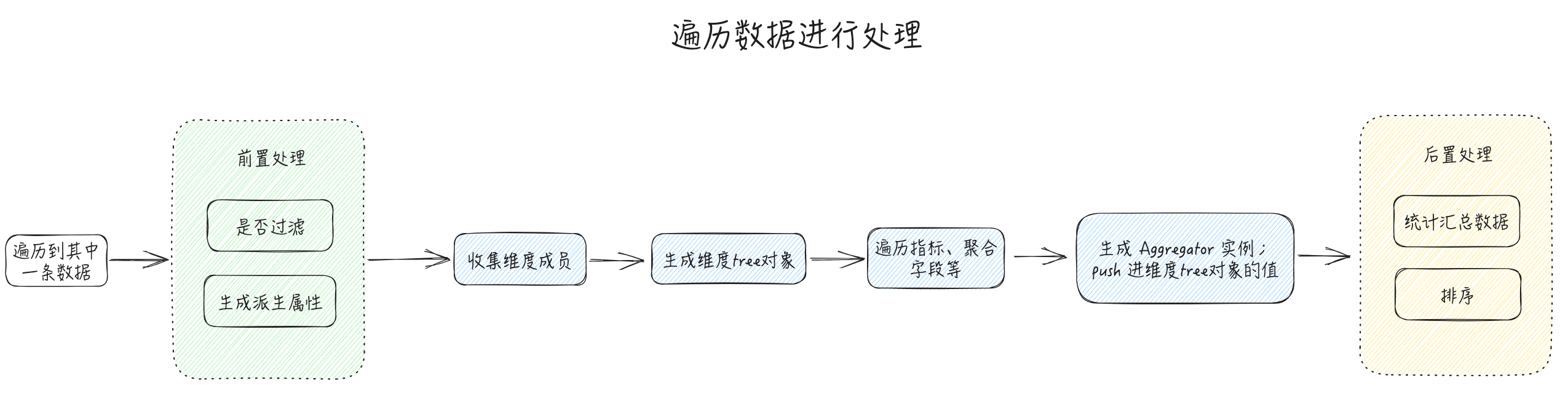
核心是维度tree对象和 Aggregator类的设计